
A strong Vimeo alternative in 2026 depends entirely on your use case: SmartVideo for ad-free website embeds with no bandwidth caps, Wistia for detailed marketing funnels, Bunny Stream for budget-conscious custom delivery, and Dacast for secure live broadcasting. There is no perfect one-size-fits-all video host anymore, primarily because the technical requirements for a fast marketing site are entirely different from the demands of a global live event.
📋 TL;DR • Why people are leaving: Vimeo’s stricter 2TB bandwidth caps, never-resetting storage ceilings of 2TB/4TB/7TB, and rising plan prices under Bending Spoons ownership are inflating costs for growing teams. • The speed factor: Your video host directly impacts Core Web Vitals; heavily scripted players can delay your Largest Contentful Paint (LCP) and hurt conversions. • AI is the new baseline: The AI video generator market is projected to reach $847 million by 2026 (Fortune Business Insights, 2026), and platforms are now competing heavily on automated transcription, translation, and AI-driven workflows. • Next steps: Define your primary objective (website speed, lead capture, or internal comms), shortlist two options, and test them on your staging site before committing.
The video landscape is shifting rapidly. By 2026, video is projected to account for roughly 82.5% of all global internet traffic (DemandSage, 2026). In parallel, 93% of video marketers say video is an important part of their strategy (Wyzowl, 2026). As reliance on video deepens, the infrastructure choices behind those videos matter more than ever. What used to be a simple decision—just upload it and grab an embed code—has evolved into a complex evaluation of Core Web Vitals and video performance, pricing predictability, and brand control.
In our testing of different setups across high-traffic sites, the underlying pattern is clear: companies are moving away from generalized hosting and migrating toward specialized platforms that align with their specific business goals. A generic platform that does everything moderately well is often outperformed by a tool engineered specifically for e-commerce, developer APIs, or high-speed website delivery.
ℹ️ What is a Vimeo alternative? A Vimeo alternative is any specialized video hosting platform that replaces Vimeo’s functionality—whether for faster website embedding, better marketing analytics, or enterprise-scale broadcasting—often providing more predictable pricing and focused features.
Why Are People Leaving Vimeo in 2026?
Vimeo has historically been the default step up from YouTube. It offered a cleaner player, no ads, and password protection. However, a series of structural and pricing changes have caused many teams to reconsider their loyalty. Understanding these shifts is essential before you explore broad options beyond Vimeo.
The Bending Spoons Acquisition and the 2TB Bandwidth Cap
In 2025, Vimeo was acquired by Bending Spoons. Following this transition, the platform began drawing far more attention to bandwidth limits that previously went loosely monitored. The Vimeo Starter plan ($12/month billed annually) carries a 2TB monthly bandwidth cap. Once a growing business exceeds that limit—perhaps due to a single successful marketing campaign or a high-traffic video hosting for e-commerce product page—they are pushed toward a custom-priced Enterprise conversation. Vimeo does not publish that price, and its own documentation lists reducing usage or migrating as alternatives rather than paying to keep their videos online.
This understanding of Vimeo’s strict 2TB limits and never-resetting storage caps is driving procurement teams to look for flat-rate or strictly usage-based alternatives where costs scale linearly with traffic, rather than jumping exponentially.
Lifetime Storage Caps and Rising Prices
Vimeo’s self-serve tiers meter one thing above all else: total storage under a cap that never resets—what Vimeo’s own docs call a “lifetime total storage cap,” one that holds only as long as you stay subscribed. Starter stops at 2TB, Standard at 4TB, and Advanced at 7TB—and because that ceiling is cumulative, every archived webinar and every outdated product demo you ever uploaded keeps consuming the allowance. Teams that publish weekly tend to hit the wall within a couple of years, then face a choice between deleting their back catalog or jumping a tier. Those tiers have also grown more expensive under Bending Spoons, so an upgrade that used to be a modest step up now lands at $25/month for Standard and $75/month for Advanced on annual billing.
Embed Performance and Core Web Vitals
Perhaps the most technically significant reason for the exodus is performance. Search engines now heavily weight Core Web Vitals—specifically Largest Contentful Paint (LCP) and Interaction to Next Paint (INP). The Vimeo player, while aesthetically clean, is relatively heavy. Loading it on a mobile connection can delay the rendering of the rest of your page, leading to higher bounce rates.
Why slow videos are a big problem comes down to user patience. A heavy player script blocks the main thread, causing the browser to freeze momentarily while it parses the video logic. Website owners focused on conversion rate optimization (CRO) are migrating to lighter, lazy-loaded players that prioritize page speed above all else.
How Much Do Video Players Actually Weigh?
The performance impact is not theoretical. Here is what popular video embeds add to your initial page load before a visitor even clicks play:
| Embed Type | Approx. JS + CSS Transfer | Impact on LCP |
|---|---|---|
| YouTube iframe | ~1.3 MB | Severe -- blocks main thread |
| Vimeo embed | ~500-600 KB | Moderate -- lighter but still significant |
| Wistia embed | ~400-500 KB | Moderate -- has built-in lazy-load options |
| Facade/lazy-load player | ~5-15 KB | Minimal -- full player loads on interaction |
A facade-based approach loads only a static poster image and a lightweight play button on initial page render. The full player runtime hydrates only when the visitor clicks play. This is the technique Lighthouse explicitly recommends in its third-party facades audit, and it is the architecture behind SmartVideo’s embed performance. The difference between loading 1.3 MB upfront and deferring it to click-time can mean 2-3 seconds of LCP improvement on mobile connections.
💡 Leaving Vimeo? Don’t rebuild your embeds by hand.
SmartVideo is ad-free with unlimited bandwidth on plans from $19/mo, and the migration guide walks through moving your library without breaking existing pages.
Quick Comparison Table: 15 Vimeo Alternatives
We tested 15 platforms across pricing, embed performance, and use case fit. The table below ranks each pick by category and entry cost. Prices were last reviewed on October 20, 2026 against each vendor’s published pricing; they change often, so confirm on the vendor’s page before you buy.
| Platform | Primary Use Case | Starting Price | Key Differentiator |
|---|---|---|---|
| SmartVideo | Website & WordPress Embeds | $19/mo | Unlimited bandwidth, CDN included |
| Jetpack VideoPress | Basic WordPress Blogs | $9.95/mo | Integrated into WordPress core tools |
| Presto Player | LMS & Course Creators | $79/yr | Bring your own hosting (BYOH) |
| Wistia | B2B Marketing & Sales | $79/mo | Deep CRM and email integration |
| SproutVideo | Internal Comms | $12/mo | Granular privacy and viewer logins |
| Vidyard | Sales Prospecting | Free / $59 per seat/mo | Video-in-email with CRM sync |
| Panopto | Higher Education | Contact Sales | Searchable lecture transcripts |
| Uscreen | Membership Sites | $49/mo | Turnkey OTT app creation |
| YouTube Courses | Audience Growth | Free | Built-in organic discovery |
| Brightcove | Global Broadcasters | Contact Sales | Server-side ad insertion (SSAI) |
| Dacast | Secure Live Events | $39/mo | China video hosting delivery |
| JW Player | Media Publishers | Contact Sales | Advanced yield monetization |
| Bunny Stream | Developers & Tech Teams | Pay-per-GB | Ultra-cheap edge storage |
| Cloudflare Stream | App Infrastructure | $5 per 1,000 min stored | Integrated tightly with Cloudflare |
| Mux | Custom Video Products | Pay-per-minute | Mux Data and API-first design |
Which Vimeo alternatives are best for website conversion?
Conversion-focused sites need a player that loads fast and keeps visitors on your domain. These three picks prioritize Core Web Vitals and clean embeds.
If your primary goal is driving sales, signups, or keeping users engaged on your landing pages, your focus should be on player speed and brand control. The tools in this category are designed specifically to live on your website and prioritize the performance of your Core Web Vitals. For website embeds, an ad-free player is critical to prevent viewers from leaking away to external networks.
1. SmartVideo
SmartVideo takes a fundamentally different approach than Vimeo. Instead of acting as a destination site, it functions as a highly optimized infrastructure layer designed exclusively to accelerate embedded videos on your own website. By focusing solely on embed performance, SmartVideo addresses the exact Core Web Vitals problems that cause bloated landing pages.

For WordPress users, the integration is particularly deep. The dedicated block and shortcode work natively within Gutenberg, Elementor, Divi, and Beaver Builder. Unlike Vimeo, which applies a 2TB bandwidth cap across its self-serve tiers, SmartVideo’s architecture provides unlimited bandwidth on all plans. This means a sudden spike in traffic won’t push you into a custom-priced enterprise conversation.
Pros: Ad-free, clean player UI, unlimited bandwidth, dedicated WordPress blocks, and CDN-accelerated delivery that significantly improves LCP times compared to standard embeds. Cons: Focused heavily on website embedding; it is not a social network or destination site for organic discovery. Pricing: $19/mo for the Startup plan; $59/mo for the Growth plan (which includes 50,000 views and 3TB storage with unlimited bandwidth).
2. Jetpack VideoPress
Jetpack VideoPress is a video hosting solution built directly into the Jetpack ecosystem for WordPress. If you already run a WordPress site and are heavily invested in Automattic’s suite of tools, VideoPress offers a straightforward transition away from Vimeo’s pricing structure.
It provides a clean, ad-free player that integrates seamlessly into the WordPress media library. You drag and drop a video just like an image, and it is automatically served from their global content delivery network rather than clogging up your shared hosting server.
Pros: Excellent native integration within the WordPress dashboard, affordable entry price, and no ads or related video distractions. Cons: Requires installing the heavy Jetpack plugin (which some developers prefer to avoid), and the paid tier has a strict 1TB total storage cap. Pricing: Free for 1 video; $9.95/mo billed yearly ($4.95/mo for the first year) for the paid tier. Source: VideoPress pricing.
3. Presto Player
Presto Player is a highly capable WordPress plugin that takes a “bring your own hosting” (BYOH) approach. It is not a hosting platform like Vimeo; instead, it is a front-end player that wraps around videos hosted elsewhere (like Bunny.net, Amazon S3, or even YouTube).
This distinction is crucial. If you leave Vimeo for Presto Player, you still need a place to store your MP4 files. However, Presto provides excellent marketing features directly inside WordPress, including email capture gates, chapter markers, and basic analytics. It is highly favored by course creators who want fine-grained control over how their media is presented.
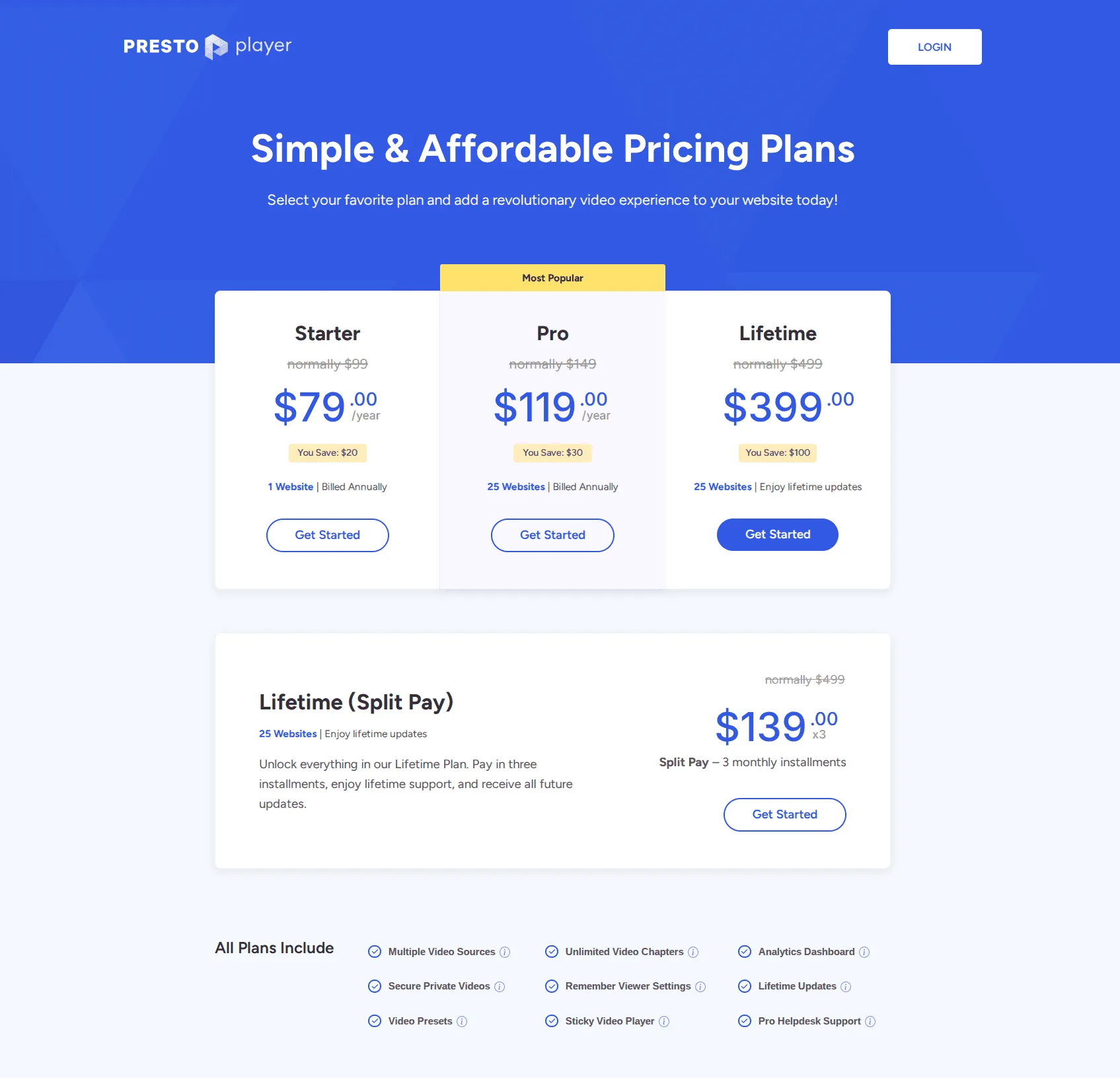
Pros: Exceptional integration with learning management systems (LMS), one-time payment options during sales, and strong on-page marketing tools. Cons: No built-in CDN or hosting (you must manage your own storage bucket), and the free tier only supports basic playback without advanced marketing features. Pricing: Free basic tier; paid plans are Starter $79/yr (1 website) and Pro $119/yr (25 websites), list prices $99 and $149. Source: Presto Player pricing.
Which Vimeo alternatives work best for marketing and lead gen?
B2B teams need video tied to CRM data and lead scoring. These three platforms turn watch behavior into qualified pipeline.
For B2B organizations, a video is a lead generation asset first and a piece of content second. The platforms in this category excel at connecting viewer behavior to your CRM, allowing you to score leads based on exactly how much of a product demo they watched. 82% of video marketers report a good ROI from video (Wyzowl, 2026), and these tools are built to prove that ROI explicitly.
4. Wistia
Wistia is the most established direct competitor to Vimeo for marketing teams. While Vimeo historically leaned toward creative professionals and filmmakers, Wistia has always targeted the B2B sales funnel. Its flagship feature, Turnstile, allows you to require an email address before a viewer can finish watching a video, passing that lead directly into HubSpot, Marketo, or Pardot.

If you also find Wistia’s pricing too steep, it’s a common complaint. The platform is highly capable, but it is an investment. They offer a free tier, but it places their branding on your player and caps you at 25 GB of storage and a single user, making it more of a trial than a permanent solution.
Wistia has been pushing hard on AI features — in April 2025, they became the first video marketing platform to offer built-in AI-powered video translation and voice dubbing across 30+ languages (partnering with HeyGen), making it notably easier to repurpose marketing and sales content for international audiences without third-party localization tools.
Pros: Strong marketing analytics, comprehensive CRM integrations, A/B testing capabilities, AI-powered translation and dubbing, and excellent podcast hosting features. Cons: Significant price jump from the free tier to the $79/mo Business tier, and costs climb with both seats and storage—extra users run $25/mo each on annual billing. Pricing: Free (25 GB storage, 1 user); Business plan starts at $79/mo billed annually ($99 monthly) with 3 seats and 250 GB storage. The CRM and marketing-automation integrations (HubSpot, Marketo, Pardot and others) come with the Lead Gen tier, listed at $329/mo billed annually. Source: Wistia pricing.
5. SproutVideo
SproutVideo operates in a similar space to Wistia but often appeals to teams who need a mix of marketing features and strict internal security. It offers detailed engagement metrics and email capture, but it also shines when you need to secure a video library for internal employee training.
You can require viewers to log in, restrict access by IP address, or use single sign-on (SSO) for corporate environments. It sits comfortably in the middle ground—more secure than standard Vimeo, but less aggressively priced than Wistia.
Pros: Excellent balance of marketing tools and granular privacy controls, customizable video landing pages, and straightforward analytics. Cons: No dedicated WordPress plugin (relies entirely on embed codes), and the entry-level plan includes just 150 GB of storage and 1,800 GB of bandwidth, with bandwidth overage billed at $0.25/GB. Pricing: Seed plan starts at $12/mo billed annually ($15/mo monthly), with 150 GB of storage and 1,800 GB of bandwidth. Source: SproutVideo pricing.
6. Vidyard
Vidyard has repositioned entirely around sales enablement, making it the go-to platform for B2B teams that use video in outbound prospecting. Where Wistia focuses on inbound marketing funnels, Vidyard focuses on the 1:1 sales motion — personalized video messages recorded via browser extension, embedded directly in sales emails through Gmail or Outlook.
The platform tracks individual viewer engagement at the contact level and syncs that data directly to Salesforce, HubSpot, Outreach, and SalesLoft. A sales rep can see exactly which prospect watched 90% of a demo and follow up accordingly. In 2025, Vidyard added AI-generated video scripts and AI avatar presenters, reducing the time it takes to create personalized outreach at scale.
If your use case is more about multimedia galleries — hosting video, audio, and images from one dashboard — Cincopa covers that niche with strong video SEO tools and customizable templates. But for dedicated sales video, Vidyard is the stronger choice.
Pros: Deep CRM integrations, individual viewer-level analytics, built-in screen and webcam recording, and AI-powered personalization features. Cons: Focused almost entirely on sales teams; not designed for website embedding or content delivery. Per-seat pricing adds up quickly for larger teams. Pricing: Free tier (5 videos per month, up to 30 minutes each); the Starter plan is $59 per seat/mo billed annually ($89 per seat monthly), and Teams and Enterprise are custom-priced. Source: Vidyard pricing.
Which Vimeo alternatives are best for course creators and education?
Why course creators are leaving Vimeo often comes down to content security and platform organization. Educational content requires structured playlists, secure paywalls, and integrations with Learning Management Systems (LMS). These platforms prioritize the student experience.
7. Panopto
Panopto is the heavyweight champion of higher education and enterprise knowledge management. If you are recording long-form lectures, Panopto’s ability to automatically transcribe audio and make every spoken word searchable is invaluable. A student can search for a specific term and instantly jump to the exact minute the professor said it in a two-hour lecture.
Pros: Extensive video search capabilities, deep integration with Canvas, Blackboard, and Zoom, and highly secure internal sharing. Cons: Complex deployment meant for large institutions, not solo course creators; opaque pricing. Pricing: Custom enterprise pricing; contact sales.
8. Uscreen
Uscreen is not just a video host; it is a turnkey platform for building your own subscription-based streaming service. If you want to build the “Netflix of Yoga” or a dedicated subscription app for your cooking classes, Uscreen handles the hosting, the paywall, the website builder, and even the creation of branded apps for Roku, Apple TV, and iOS.

It replaces Vimeo OTT (formerly VHX), which has seen stagnating development prior to 2026. Uscreen focuses heavily on community building, allowing creators to foster interaction directly alongside their paid video content.
Pros: All-in-one monetization, community features, and the ability to launch dedicated mobile and TV apps. Cons: Costs climb quickly beyond the entry tier, with a per-subscriber fee on top of the monthly price on Growth and above. Pricing: Starter $49/mo (up to 100 subscribers, no subscriber fee); Growth from $149/mo plus $1.99 per paid member. Source: Uscreen pricing.
9. YouTube Courses
YouTube has aggressively expanded its educational features with YouTube Courses. This allows creators to offer structured, multi-video learning environments directly on the world’s largest video platform. You can offer courses for free or put them behind a paywall (if you meet the YouTube Partner Program requirements).

The main advantage here is distribution. YouTube’s algorithm can push your course to millions of relevant viewers. However, while YouTube is free, be aware of how YouTube embeds hurt your website and their impact on page speed — you sacrifice control, you cannot easily capture email addresses for your own list, and you are subject to their aggressive ad policies.
Pros: Massive organic reach, completely free to host, and familiar interface for students. Cons: Zero ownership of the customer relationship, ads can disrupt the learning experience, and strict monetization thresholds. Pricing: Free (monetization requires partner status).
Which Vimeo alternatives are best for enterprise and broadcasters?
Enterprise broadcasters need uptime guarantees, transparent pricing, and global delivery. These three platforms are built for that scale.
From what we’ve seen supporting high-traffic video deployments, when downtime means losing thousands of dollars a minute or when you are streaming live sports to a global audience, consumer-grade hosting fails. These platforms provide Service Level Agreements (SLAs), dedicated engineering support, and advanced monetization architecture.
10. Brightcove
Brightcove is the standard-bearer for enterprise video. It is the engine behind massive media publishers, global sports leagues, and Fortune 500 internal communications. Their infrastructure is designed to handle millions of concurrent streams without degrading quality.

One of their strongest features is Server-Side Ad Insertion (SSAI). This technique stitches advertisements directly into the video stream before it reaches the viewer’s device, effectively bypassing client-side ad blockers and protecting publisher revenue. This alone justifies their premium pricing for large media entities.
Pros: Extensive scale and reliability, advanced SSAI technology, and exhaustive API access for custom integrations. Cons: Highly complex implementation, significant cost, and a dashboard that can overwhelm non-technical users. Pricing: Custom enterprise pricing; contact sales.
11. Dacast
If your organization relies heavily on live broadcasting—such as mega-church services, municipal government meetings, or corporate town halls—Dacast is a formidable alternative to Vimeo Premium. They operate on a white-label basis, ensuring that your branding remains front and center, never theirs.
Notably, Dacast maintains strong partnerships that allow for reliable video delivery into mainland China, a notoriously difficult technical challenge that many other providers cannot solve. They also offer integrated pay-per-view and subscription monetization for live events.
Pros: Exceptional live streaming architecture, transparent pricing compared to enterprise rivals, and global delivery including China. Cons: The user interface is functional but dated, and the sheer number of encoding options can be confusing for beginners. Pricing: Starter plan begins at $39/mo billed annually (500 GB storage, 2.4 TB of bandwidth per year). Source: Dacast pricing.
12. JW Player
Originally famous for providing the player technology behind early YouTube, JW Player has evolved into a comprehensive hosting, streaming, and monetization platform tailored for digital publishers. They focus heavily on engagement and yield optimization.
Their recommendation engine analyzes viewing habits to automatically queue up highly relevant follow-up content, keeping viewers on the publisher’s site longer. They also offer sophisticated ad bidding integrations to maximize the revenue generated per impression.
Pros: Highly optimized HTML5 player, excellent automated recommendations, and deep advertising tech stack. Cons: Primarily geared toward ad-supported publishers; overkill for a standard corporate website. Pricing: Custom enterprise pricing; contact sales.
Which Vimeo alternatives work best for developers on a budget?
Developer-focused teams want pure delivery, predictable usage pricing, and an API-first model. These three options skip the marketing fluff.
Sometimes you don’t need a fancy dashboard, marketing tools, or CRM integrations. We’ve worked with developer teams who just need a reliable pipe to deliver MP4s to their custom application as cheaply and efficiently as possible. These API-first platforms cater to engineering teams.
13. Bunny Stream
Bunny.net started as a budget-friendly Content Delivery Network (CDN) and expanded into video with Bunny Stream. It strips away the marketing fluff and gives you raw, highly performant video delivery for pennies on the dollar compared to traditional hosts.

It automatically handles transcoding, edge storage, and global delivery. Because they own the underlying CDN infrastructure, their pricing is exceptionally aggressive. However, it is an infrastructure product: there is no WordPress plugin, no Turnstile, and no fancy analytics dashboard. In March 2026, Bunny launched a redesigned video player built on Web Components and the open-source Media Chrome project, delivering improved accessibility (screen readers, keyboard navigation) and better cross-browser consistency — a meaningful upgrade for teams who previously had to build their own player UI.
Pros: Exceptionally low cost, massive global edge network, and full-featured API. Cons: Requires developer knowledge to implement effectively; no built-in player UI customization tools. Pricing: Usage-based (from roughly $0.01 per GB for storage and $0.005 per GB for delivery, with a $1 monthly minimum). Source: Bunny pricing.
14. Cloudflare Stream
Cloudflare Stream is an elegant solution if your application infrastructure is already tied to the Cloudflare ecosystem. It simplifies the entire video pipeline. You push a video file via their API, and Cloudflare handles the encoding, storage, and global delivery across their massive edge network.

Their pricing model is refreshingly simple: you pay for minutes stored and minutes viewed. There are no bandwidth calculations or hidden fees. It is built for developers creating video-centric apps (like a custom social network or a bespoke training platform).
Pros: Predictable minute-based pricing, leverages Cloudflare’s massive network, and extremely fast encoding. Cons: Limited out-of-the-box player customization and requires engineering resources to deploy. Pricing: $5 per 1,000 minutes stored (prepaid in $5 increments), plus $1 per 1,000 minutes delivered. Source: Cloudflare Stream pricing.
15. Mux
Created by the original founders of Video.js, Mux is the ultimate video platform for engineering teams. They offer two main products: Mux Video (for hosting and streaming) and Mux Data (for granular performance analytics). Their API-first design allows product teams to build highly customized video experiences from the ground up.
Mux treats video as data. They provide unparalleled insight into playback failures, buffering events, and stream quality metrics, allowing developers to diagnose and fix playback issues on a user-by-user basis. In 2025, Mux released a Model Context Protocol (MCP) server that lets AI agents interact with their full video API through natural language — uploading videos, managing live streams, and querying engagement data programmatically. It signals where developer-focused video infrastructure is heading.
Pros: Granular diagnostic data, exceptionally reliable API, and high-quality adaptive bitrate streaming. Cons: Purely a developer tool; completely inaccessible for a marketing coordinator looking for an embed code. Pricing: Pay-as-you-go based on minutes processed, stored, and delivered; a Launch plan prepays $100 of usage credits for $20/mo. Source: Mux pricing.
The Hidden Trade-Off: Free Hosts vs Paid Platforms
Free hosts trade brand control for unlimited bandwidth. Paid platforms offer cleaner embeds and analytics. The right pick depends on your traffic volume.
The conversation often loops back to a simple question: “Why not just use YouTube?” YouTube is free, and for brand awareness, it remains unparalleled. However, if your primary concern is securing internal comms or maximizing website conversions, free hosting carries a hidden tax.
When you embed a YouTube player on your landing page, you are actively inviting a competitor’s algorithm onto your site. At the end of your carefully crafted product demo, YouTube will suggest a grid of “related videos”—which often include your direct competitors. Furthermore, YouTube’s embed iframe is heavy, frequently adding over 1.3MB of JavaScript to your page payload before the user even clicks play. This bloat actively damages your Core Web Vitals, leading to slower page loads and degraded search rankings.
Paid platforms, particularly those focused on website embeds like SmartVideo, treat your website as the final destination. They load asynchronously, adding mere kilobytes to your initial page load, and they never hijack the user’s attention with algorithmic recommendations.
How do you migrate off Vimeo without breaking embeds?
Migrating off Vimeo without breaking embeds takes preparation. Follow this checklist to preserve SEO, analytics, and viewer experience during the cutover.
If you have decided that Vimeo’s 2TB bandwidth limits or never-resetting storage caps no longer fit your model, do not execute a blind switch. A poorly planned migration will break your existing embeds and destroy your SEO value. Follow this technical checklist:
- Audit Your Existing Embeds: Use a crawler tool (like Screaming Frog or a custom script) to identify every URL on your domain that currently contains a
player.vimeo.comiframe. You cannot replace what you haven’t mapped. - Download the Highest Quality Source Files: Do not download the compressed 720p versions. Navigate to Vimeo’s settings and retrieve the original source files you uploaded. Your new host will need these to generate fresh, optimized adaptive bitrate streams.
- Configure Your New Player’s Poster Images: A missing poster image will result in an ugly black box on your website while the player initializes. Ensure your new platform supports high-resolution, lazy-loaded poster frames.
- Update DNS and CNAME Records: If you are using a custom domain for your video links (e.g.,
video.yourcompany.com), ensure your DNS records are pointed to the new provider to maintain link integrity and prevent 404 errors. - Monitor Core Web Vitals Post-Launch: After swapping the embed codes on your top 10 highest-traffic pages, wait 48 hours and review your Google Search Console. Verify that your LCP and INP scores have remained stable or improved.
Which Vimeo alternative should you choose in 2026?
Picking a Vimeo replacement comes down to use case. Match the platform to how your videos earn revenue, not just price per gigabyte.
The era of treating video hosting as a generic utility is over. The technical demands of modern web design, the strict limits imposed by Bending Spoons’ acquisition of Vimeo, and the necessity of proving marketing ROI require specialized tools. If you are building an app, use Mux or Cloudflare. If you are tracking B2B leads, invest in Wistia. But if your primary objective is delivering blazing-fast, buffer-free, ad-less video on your own website, you need a platform engineered specifically for that task.
Don’t let heavy player scripts drag down your conversions. Secure a fast, fully branded experience that protects your Core Web Vitals and keeps your audience focused entirely on your content.
Try SmartVideo Free for 14 Days →
FAQ: Vimeo Alternatives
These are the questions we get asked most about leaving Vimeo, with short answers backed by our testing across the platforms above.
Why are people leaving Vimeo in 2026?
Businesses are migrating away from Vimeo largely due to the 2TB monthly bandwidth cap that applies across its self-serve plans, which can lead to a custom-priced Enterprise conversation for a high-traffic account. Additionally, Vimeo’s never-resetting storage ceilings—2TB on Starter, 4TB on Standard, 7TB on Advanced—combined with rising plan prices, push long-running video libraries into higher tiers over time.
Is there a completely free alternative to Vimeo?
YouTube is the only truly free alternative that offers no published storage or bandwidth cap and no expiration. However, this comes at the cost of brand control, as YouTube embeds display ads, show related videos from competitors, and add significant script weight that slows down page loading.
What is the best Vimeo alternative for WordPress websites?
For WordPress sites, platforms that offer dedicated native blocks and prioritize Core Web Vitals are recommended. Commercial video hosting solutions typically offer more control over branding and player customization, alongside CDN-accelerated delivery that prevents large video scripts from delaying the Largest Contentful Paint (LCP) metric. Look for platforms with dedicated WordPress blocks, lazy-loaded facades, and unlimited bandwidth.
How do Vimeo’s bandwidth caps actually work?
Vimeo applies a 2TB monthly bandwidth cap to the whole account rather than tracking individual video views. Vimeo’s pricing page states the 2TB limit outright and says it is set so that 99% of users never reach it, and crossing it does not cut playback off on the spot: automated notifications come first, then direct outreach if high usage continues, and the stated options include a custom plan, bringing usage back below the cap, or migrating off Vimeo.
Which Vimeo alternative is best for course creators?
Course creators generally prefer platforms like Panopto, Uscreen, or Presto Player. These platforms provide features critical for education, such as secure paywalls, granular viewer access permissions, searchable transcripts, and integrations with Learning Management Systems (LMS) to protect intellectual property.
Can I easily migrate my existing videos from Vimeo to another host?
Yes, but it requires careful execution. You must download the original source files from Vimeo, upload them to the new provider to generate fresh adaptive bitrate streams, and systematically map and replace every player.vimeo.com iframe on your website to ensure you do not break existing pages or harm your SEO.
What is the best Vimeo alternative for developer teams?
Engineering teams and developers building custom applications typically choose API-first platforms like Mux, Cloudflare Stream, or Bunny Stream. These services operate on strict usage-based pricing models (charging per minute or per GB) and provide deep diagnostic data without the overhead of marketing dashboards.
Does switching video hosts impact my website SEO?
Switching hosts impacts SEO primarily through page speed changes. If you migrate from a heavy player to a lightweight, lazy-loaded player, your Interaction to Next Paint (INP) and LCP scores will likely improve, which Google rewards. Additionally, properly configured video schema markup provided by the new host helps maintain video snippet visibility in search results.
Why is Wistia so much more expensive than Vimeo?
Wistia’s higher price point (starting around $79/mo) reflects its focus on B2B lead generation rather than simple hosting. You are paying for marketing tools, in-video CTAs, and lead capture, with the CRM and marketing-automation integrations (HubSpot, Marketo, Pardot and others) sitting in the higher Lead Gen tier at $329/mo billed annually, plus analytics that show which parts of a sales video specific leads skipped or re-watched.
What happens to my Vimeo links if I cancel my account?
If you cancel your Vimeo subscription, any existing vimeo.com URLs or embed iframes on your website will immediately break and display an error message. You must secure a new hosting provider and update the embed codes on all your live pages before finalizing your Vimeo cancellation to avoid downtime.