
TL;DR
- A video embed code is an HTML snippet that loads a player hosted by another service; an iframe creates a separate browsing context rather than copying the video file into your site.
- Use a descriptive
title, explicit dimensions, a deliberatereferrerpolicy, a permissionsallowlist, and lazy loading for players below the fold.- oEmbed can return player HTML from a provider, but endpoints, authentication, and response types differ. Meta’s Graph API requires more setup than the public YouTube, Vimeo, or Wistia endpoints.
- Use responsive CSS and test privacy and playback settings. YouTube’s
rel=0no longer removes related videos, and privacy-enhanced mode is not a blanket guarantee that no data is transmitted.
A video embed code is a snippet of HTML—most often an <iframe> element or a JavaScript loader—that places a remotely hosted video player inside a page. The browser loads the provider’s player document and media resources while the visitor stays on your site. It does not copy the video file into your page. If you are choosing where the video should appear before working with the markup, see our guide to embedding video on a website.
The host controls much of the player interface and playback behavior. Your markup still matters: it affects accessibility, responsive layout, browser permissions, referrer information, and when the player loads. The sections below explain the code, how providers return it, and how to debug common problems.
What does a video embed code do?
An embed code places a remotely hosted video player inside a page using an iframe, script loader, or native video element.
An iframe loads a provider-hosted player document in a separate browsing context. MDN’s iframe reference notes that each frame can require additional memory and computing resources (MDN, 2026). It is not automatically sandboxed; the HTML standard describes the optional sandbox attribute (WHATWG, 2026).
Video usually reaches a page in one of three ways:
| Method | What it loads | When it fits |
|---|---|---|
| Iframe embed | A separate player document from the hosting platform. | Use the host’s standard embed when you want its player, controls, and streaming behavior. |
| JavaScript loader | A script that creates a player container, iframe, or custom element. | Use it when the host’s player API needs events, dynamic sizing, or other script-based integration. |
Native HTML <video> | A media resource played by the browser’s media engine. | Use it when you manage the media files, encoding, delivery, and player behavior yourself. |
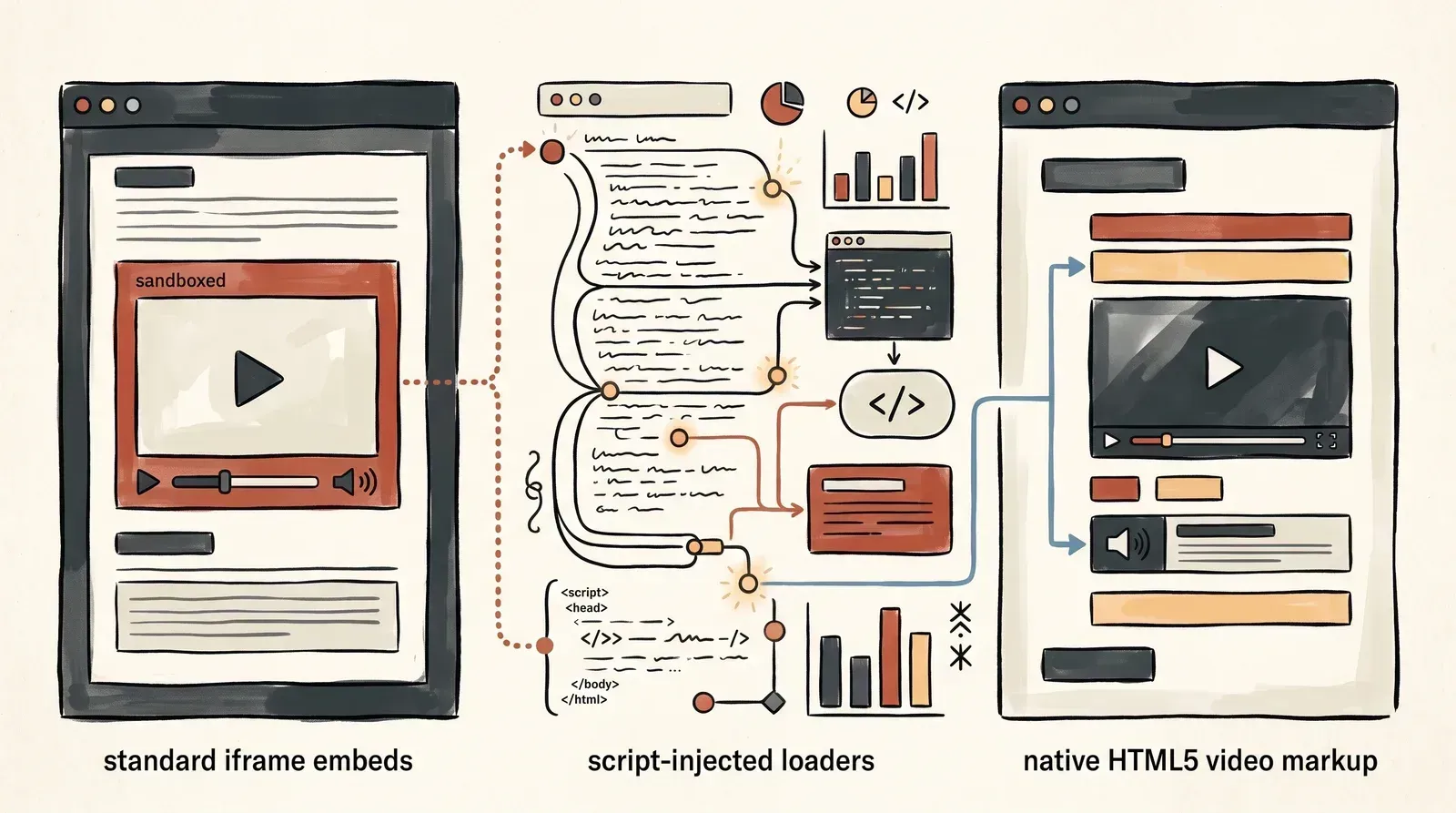 An iframe gives the provider a separate document, a script loader adds a player to the page, and native video uses the browser’s media element.
Native <video> offers direct control over the element and avoids a third-party iframe, but it also means you must handle encoding, storage, and delivery. Learn more about the browser’s HTML5 video player.
What belongs in a video iframe?
Use the provider’s current embed code, then check its title, dimensions, loading behavior, referrer policy, and permissions.
<div class="video-container">
<iframe
src="https://www.youtube-nocookie.com/embed/VIDEO_ID?rel=0&playsinline=1"
title="Product demonstration video"
width="560"
height="315"
loading="lazy"
referrerpolicy="strict-origin-when-cross-origin"
allow="accelerometer; autoplay; encrypted-media; gyroscope; picture-in-picture; web-share"
allowfullscreen>
</iframe>
</div>The attributes each serve a different purpose:
srcpoints to the provider’s player and can include supported playback parameters. Use the host’s embed URL rather than guessing a URL format.titlegives screen-reader users a concise description of the embedded frame. Prefertitle="Product walkthrough for the analytics dashboard"to a generic label such astitle="video". For more on media accessibility, see our guide to video accessibility and captions.widthandheightset the frame’s dimensions. Pair them with a responsive container that defines an aspect ratio so the player can shrink without collapsing its reserved space; see our guide to aspect ratio.loading="lazy"lets the browser defer a below-the-fold iframe until it is near the viewport. It is usually inappropriate for a player that is immediately visible and important to the page’s first screen.referrerpolicycontrols the referrer information sent when requesting the iframe. Do not set a policy that prevents a provider from receiving information its embed requires.allowsets a Permissions Policy for features used by the embedded player, such as autoplay, fullscreen, picture-in-picture, or encrypted media. Grant only what the player needs.allowfullscreenpermits the frame to enter fullscreen. Keep it when fullscreen playback is part of the player experience.
The sample does not include sandbox. Adding that attribute restricts the embedded page and can break player features unless the host’s required sandbox permissions are configured. Check the provider’s documentation before applying it.
How does oEmbed return player HTML?
oEmbed lets a consumer request structured embed data for a media URL, often including HTML for the player. The oEmbed specification defines this protocol (oEmbed, 2026).
Common oEmbed response types include:
| Type | Common fields | Typical use |
|---|---|---|
video | html, width, height, version, type | A playable video player, often an iframe. |
rich | html, width, height, version, type | A more complex widget, such as a channel or interactive player. |
photo | url, width, height, version, type | An image representation. |
| link type | version, type, optional metadata | Generic embed data without url or html; the consumer may link to the requested URL. |
A video response may include a title, author, thumbnail URL, dimensions, and an html field. That HTML is provider-generated embed markup. The consumer should use the provider’s documented endpoint and response contract rather than assume every response has identical fields.
Provider endpoints are not interchangeable
The endpoint, authentication requirements, and response shape vary by host. These examples show the endpoint conventions described in provider documentation; confirm the current API version and request parameters before integrating them.
| Provider | Endpoint pattern | Authentication | Typical response |
|---|---|---|---|
| YouTube | https://www.youtube.com/oembed | Public endpoint | video response with iframe HTML. |
| Vimeo | https://vimeo.com/api/oembed.json | Public endpoint for available videos | video response with player HTML. See Vimeo’s oEmbed overview. |
| Wistia | https://fast.wistia.com/oembed.json | Public endpoint | A video can return video; a Wistia Channel can return rich. See Wistia’s oEmbed documentation. |
| Facebook and Instagram | Graph API oEmbed endpoints, such as /{version}/oembed_video | Meta app credentials and Meta oEmbed Read access for supported production use | Video or post markup, subject to the endpoint’s current requirements. |
A failed oEmbed request does not always mean the video was deleted. The URL may be malformed, the item private, embed permission disabled, the response format unsupported, or access unavailable to the requesting application. Treat status codes as errors to handle, then check the provider’s response and the video’s privacy settings. Vimeo, for example, can return truncated metadata for a domain-private link when the whitelisted domain is missing from the request header, and a 404 for an unlisted link without its hash (Vimeo’s oEmbed guidance).
Wistia’s endpoint is host-agnostic: it matches media URLs by their path, not their domain, when the path begins with a recognized prefix. A single video generally returns an iframe-style video response, while a Wistia Channel can return rich HTML with a JavaScript loader. Do not assume all Wistia URLs or response types use the same markup.
How does Meta oEmbed access work?
Meta oEmbed uses Graph API endpoints for embedding public Facebook and Instagram pages, posts, and videos.
Meta’s April 8, 2025 announcement introduced Meta oEmbed Read as a replacement for the legacy oembed_read feature; an October 8 update scheduled automatic migration for November 3, 2025 (Meta’s migration announcement) (Meta for Developers, 2025).
 The app and access requirements sit before the API response; metadata omitted from the response needs another source.
The migration changed several integration assumptions:
- Meta’s October 8, 2025 update said these fields would no longer be returned from affected oEmbed responses after November 3, 2025:
author_name,author_url,thumbnail_height,thumbnail_url, andthumbnail_width. The Meta oEmbed Read documentation describes the current response and access requirements (Meta for Developers, 2026). - Meta announced the deprecation of an oEmbed endpoint for Facebook Page posts. The current Graph API reference still lists
/oembed_page, so check the current endpoint documentation rather than assuming that endpoint was removed. - Live access requires successful App Review and business verification; Meta notes that additional contracts may also be required.
In our testing on September 6, 2026, an unauthenticated request to /instagram_oembed returned a payload rather than an OAuthException. That behavior is undocumented and may change; build against Meta’s documented access requirements, not a successful tokenless request observed once.
Which iframe attributes matter for accessibility and performance?
Iframe attributes label the player, reserve layout space, defer off-screen requests, and control which browser features the embedded player can use.
Give the frame a descriptive title and reserve its space
Screen-reader users rely on the iframe’s title to understand what the frame contains before entering it. Describe the video itself or its purpose, and use a different title for each distinct video. The frame’s width and height attributes set its dimensions; a responsive container with an explicit aspect ratio can keep the frame’s space reserved as it shrinks.
Lazy-load players below the fold
Add loading="lazy" to an iframe that starts outside the initial viewport. The browser can defer its request until the frame is a calculated distance from view, reducing early network work when a page has several embeds. For an immediately visible hero video, lazy loading may delay the content a visitor came to see. MDN notes that browser iframe lazy loading operates only when JavaScript is enabled, as an anti-tracking safeguard.
Limit player permissions
The iframe’s allow attribute controls permissions such as autoplay, fullscreen, picture-in-picture, encrypted media, and orientation sensors. A video that does not use a feature does not need its permission. The standalone allowfullscreen attribute remains supported for fullscreen playback; the modern Permissions Policy syntax can express fullscreen in allow as well.
Preserve the referrer information the player requires
The referrerpolicy attribute controls how much referrer information the browser sends with iframe requests. YouTube recommends strict-origin-when-cross-origin when setting a Referrer-Policy; missing referrer information can cause embedded playback Error 153. Avoid setting a policy that suppresses the referrer, such as no-referrer, and follow Google’s required minimum functionality guidance. The YouTube embed and privacy-enhanced mode guidance documents the Error 153 requirement.
Add video structured data separately if the page needs it; it is not a substitute for accessible iframe markup. Our guide to video schema markup explains the page-level option.
Which YouTube player parameters still work?
YouTube player parameters control playback, captions, and recommendations. Google’s player parameter reference documents current behavior and records the modestbranding deprecation (Google Developers, 2026).
Google announced the modestbranding deprecation on August 15, 2023; the parameter now has no effect. The rel behavior changed on or after September 25, 2018: rel=0 restricts post-playback related videos to the same channel instead of removing them (Google Developers, 2026).
| Parameter | Values | Behavior and notes |
|---|---|---|
autoplay | 0 or 1 | Requests automatic playback. Browsers may block autoplay, especially with sound. |
controls | 0 or 1 | Shows or hides the player controls. Consider accessibility before hiding them. |
playsinline | 0 or 1 | On iOS, requests inline playback in mobile browsers and WebViews configured to allow it. |
loop | 0 or 1 | Loops playback; for a single video, set playlist to the same video ID. |
start / end | Seconds | Requests playback from a start time and, when provided, stops at an end time. |
cc_load_policy | 1 | Requests captions to display by default. |
enablejsapi and origin | enablejsapi=1; your site origin | Use the JavaScript API only when needed and set origin to the page’s domain as described by the API documentation. |
For mobile playback, autoplay=1 and playsinline=1 can be used together, but browsers can still block autoplay. Test the final embed on the devices and browsers your audience uses.
What do privacy-enhanced YouTube and Vimeo embeds do?
YouTube’s privacy-enhanced mode and Vimeo’s dnt=1 setting change specific player behavior, but neither guarantees zero data use.
YouTube’s privacy-enhanced mode uses www.youtube-nocookie.com in place of the standard embed host. Google’s guidance focuses on limiting the effect of embedded views on a viewer’s YouTube experience and serving non-personalized ads when ads appear (YouTube Help, 2026). It is not a guarantee that an embed makes no network requests or that no privacy obligations apply. Disclose the integration and assess consent requirements for the places where your site operates; do not treat a domain switch as a complete compliance review.
Vimeo offers a dnt=1 player parameter. Vimeo says it blocks player session data and analytics, similar to a browser’s Do Not Track setting, while some essential cookies remain active. Review Vimeo’s player parameter documentation and test the player behavior you need; do not describe the parameter as disabling every form of tracking (Vimeo Help, 2026).
How can CSS make a video embed responsive?
A 16:9 video container can stay fluid with CSS aspect-ratio; the older padding hack uses padding-top: 56.25% of its containing width. MDN describes the CSS aspect-ratio property (MDN, 2026).
 Both approaches preserve a widescreen player;
 aspect-ratio states the ratio directly on the container.
.video-container {
  width: 100%;
  max-width: 800px;
  aspect-ratio: 16 / 9;
}

.video-container iframe {
  display: block;
  width: 100%;
  height: 100%;
  border: 0;
}
Keep explicit dimensions in the iframe markup, such as width="560" and height="315", and let the CSS container control the rendered size. If you apply aspect-ratio directly to an iframe, at least one computed dimension must be automatic for the ratio to affect its size. A fixed width and fixed height determine the box dimensions, so the ratio cannot change them. For a direct iframe rule, use an automatic height, for example width: 100%; height: auto; aspect-ratio: 16 / 9;, and test it in the site’s actual layout.
How do third-party players affect page performance?
A third-party player can add network requests and script work before playback begins, especially when several embeds load together.
Google’s web.dev embed best practices describe the facade pattern: show a lightweight poster and play button instead of the full iframe, then load the player after activation (web.dev, 2021).
web.dev reports that lazy-loading a YouTube embed can save approximately 500 KB on initial page load (web.dev, 2021). One option is the facade pattern: show a lightweight poster image and play button in place of the full player, then load the iframe after the visitor activates it. Some implementations also preconnect to the player host on hover. The full player is still available, but it does not need to load with the rest of the page before the visitor chooses to play.
 The SmartVideo settings shown here include controls for iframe playback, schema markup, and conditional script loading.
How do you troubleshoot broken video embeds?
Broken video embeds often come from a mismatch in the URL, permissions, referrer policy, playback settings, or responsive dimensions.
| Symptom | Likely cause | What to check |
|---|---|---|
| Blank YouTube player or Error 153 | The request does not send referrer information. | Remove no-referrer; use the provider’s generated referrer policy or the browser default. |
| Player says embedding is disabled | The creator or account restricts embeds. | Check the video’s sharing and domain permissions in the host’s settings. |
| Autoplay does not start on mobile | Playback is unmuted, inline playback is not enabled, or the browser blocks autoplay. | Try muted playback and playsinline=1, then test against browser policy. |
| Layout jumps when the player appears | The iframe or its container has no reserved dimensions. | Set explicit dimensions and give the responsive container an aspect ratio so the frame’s space is reserved before player content loads. |
| oEmbed request returns an error | The URL is malformed, private, restricted, or unsupported by the requested endpoint. | Confirm the canonical video URL, permissions, endpoint, response format, and authentication. |
| Meta oEmbed request fails | The app lacks the required access, permission, or current endpoint. | Check Meta oEmbed Read requirements and the current endpoint documentation. |
YouTube shows related videos with rel=0 | rel=0 limits suggestions to the same channel; it does not remove them. | Choose a different player if you need an end screen with no YouTube recommendations. |
If you are comparing embedding choices rather than debugging markup, our guides to why YouTube embeds can hurt website performance and the best video players for websites cover related decisions. For distribution beyond standard web pages, see embedding video in email.
If maintaining third-party player markup, permissions, and responsive behavior is taking time from your team, Swarmify SmartVideo offers a managed video hosting and embed option.
What are common questions about video embed codes?
These answers cover embed behavior, accessibility, privacy, responsive sizing, and common playback failures.
What is the difference between an iframe and a JavaScript video embed?
An iframe loads a player document from the video provider, while a JavaScript embed runs a script that creates or configures the player on the page. JavaScript loaders can expose player events and dynamic sizing, but they also add script execution to the page.
Can I remove YouTube branding with an embed parameter?
No. Google deprecated modestbranding, and the parameter no longer changes player branding. YouTube decides how to present its branding based on the player and its current rules.
What causes YouTube Error 153 on an embedded video?
Error 153 can occur when the embed request does not include referrer information required by YouTube. Check for referrerpolicy="no-referrer" or another setting that strips the header, then test the provider’s recommended policy.
Does YouTube privacy-enhanced mode make an embed completely private?
No. Privacy-enhanced mode changes how YouTube handles an embedded view and can affect ad personalization, but it is not a guarantee that no data is transmitted. Site owners still need to review disclosures and consent obligations that apply to their visitors.
What does Vimeo’s dnt=1 parameter do?
Vimeo says dnt=1 blocks player session data and analytics, similar to a browser’s Do Not Track setting. Some essential cookies remain active.
Why did Facebook and Instagram oEmbed requirements change?
Meta announced Meta oEmbed Read as the replacement for the legacy oembed_read feature; an October 8, 2025 update scheduled automatic migration for November 3, 2025. Its current documentation requires App Review and business verification for live data.
How do I make an iframe embed responsive without a layout shift?
Make the container fluid with width: 100% and aspect-ratio: 16 / 9, then make the iframe fill it. The container’s ratio reserves space as its width changes.
What is a video player facade?
A facade is a lightweight placeholder, usually a poster image with a play control, shown instead of the full player during the initial page load. After the visitor activates it, the page replaces the placeholder with the actual iframe and player scripts.
For hosting options beyond embedded YouTube, see our guide to hosting videos without YouTube and our YouTube competitor comparison.