LearnDash’s Video Progression makes learners watch a video before they complete a lesson or topic. SmartVideo accelerates those videos while LearnDash keeps tracking progress: keep LearnDash’s native HTML5 player, give it a direct MP4 URL, and turn on Background & HTML5 videos (Growth and Pro).
SmartVideo’s Background & HTML5 videos setting optimizes the existing video element without replacing it with the SmartVideo player. LearnDash still handles progression.
Set up the progression video
- Install and activate the SmartVideo WordPress plugin if you have not already.
- Open SmartVideo in the WordPress admin sidebar, select Settings, and turn on Background & HTML5 videos (available on the Growth and Pro plans). Settings save automatically.
- Upload the MP4 to your WordPress Media Library or Amazon S3 (the HTML5 sources LearnDash lists for Video Progression) and copy its file URL, such as
https://your-site.example.com/wp-content/uploads/2026/10/lesson.mp4. It must return the video bytes without a login and remain publicly accessible for as long as the video is embedded. Do not use an expiring or signed URL: SmartVideo re-fetches the original for fallback and re-conversion. A SmartVideo Library embed is not a direct source URL. - In LearnDash, edit the lesson or topic. On its Settings tab, under Display & Content Options, enable Video Progression and paste the MP4 URL into Video URL.
- Choose the progression options you need and save the lesson or topic. See LearnDash’s Video Progression documentation for display timing, auto-completion, and other options.
Note: Do not use a SmartVideo block, shortcode, or <smartvideo> tag as the progression video, or rely on YouTube/Vimeo auto-conversion for this setup.
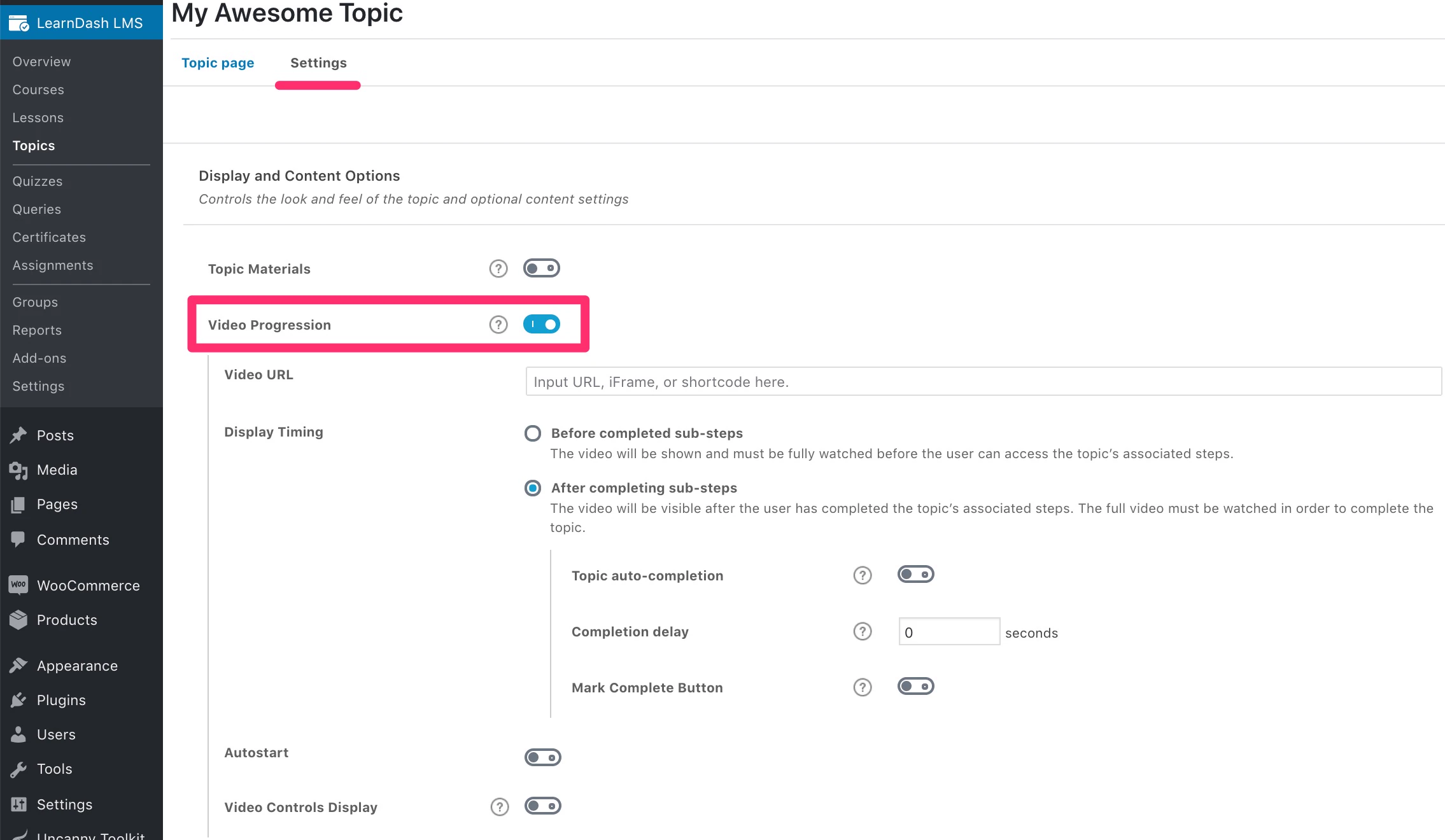
The screenshot above shows older LearnDash settings; use the current labels in the steps above.
Check playback and completion
Your video stays in LearnDash’s standard HTML5 player. Once processed, SmartVideo delivers it from its CDN in supported browsers. A video usually takes about as long as it runs to convert, and longer when our encoders are busy.
Test the lesson as an enrolled learner: play the video through to the end and confirm that LearnDash’s completion behavior matches the options you selected. LearnDash notes that progression rules do not apply to an administrator with Bypass Course Limits enabled, or to a course set to Open.
If playback or completion does not work, contact support with the lesson URL and the browser you tested.
Hosting LearnDash course video? See the LearnDash video hosting overview.