Adaptive bitrate streaming (ABR) is a video-delivery method that gives the player several versions of the same video and switches between them as the viewer’s bandwidth, buffer, device, and screen change. A good ABR setup starts with the highest quality the connection can sustain, steps down before playback stalls, and moves back up when conditions improve.
📋 TL;DR • What ABR does: It gives the player multiple versions of one video and chooses the next segment for current viewing conditions. • Why it helps: Stepping down before the buffer empties can reduce stalls on changing networks. • What it needs: The encoder, packager, manifest, player, CDN, and source quality must all work together. • Website-owner takeaway: A managed video host can operate that delivery pipeline while you upload and embed videos.
That quality change you see when a video moves from “1080p” to “480p” on a crowded Wi-Fi connection is the visible part of a larger pipeline. The encoder, packager, manifest, player, and CDN all have jobs to do. For a website owner, the practical question is not whether ABR sounds useful; it is whether your video host handles that pipeline well enough that visitors can watch without you operating a streaming platform.
Why a fixed video file struggles on changing networks
A normal MP4 download has one encoded version and one data rate. If it needs 8 Mbps but a viewer’s connection delivers 3 Mbps, playback pauses while the player waits for bytes.
ABR changes the delivery model. Instead of asking every viewer to consume the same file, the player can choose from a prepared set of renditions. “Adaptive” describes the player’s decision during playback; it does not mean the original video is being re-encoded in real time for every visitor.
How adaptive bitrate streaming works
A five-step ABR workflow
ABR turns one upload into synchronized choices. The codecs, segment lengths, and ladder values vary, but the handoff follows this pattern:
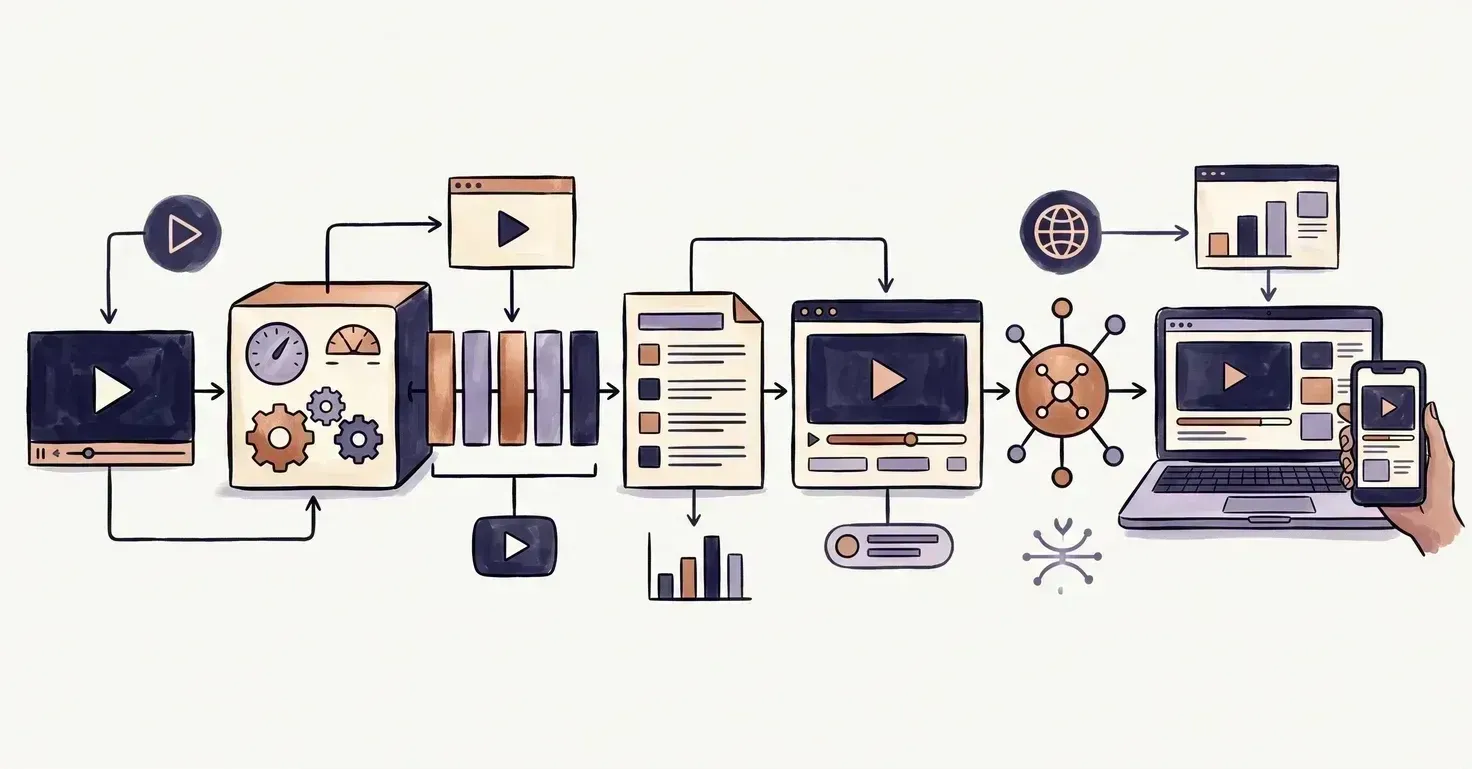 Every rendition is cut on the same segment boundaries, which is what lets the player switch quality mid-playback without a visible restart.
- Encode multiple renditions. The encoder creates versions at different resolutions and bitrates, such as a low-bandwidth mobile version, a midrange version, and a high-quality desktop version. Each rendition is a complete playable representation of the same timeline.
- Split the renditions into segments. The packager divides each version into short media files. Segment boundaries line up across the ladder, so the player can move from one rendition to another at a safe point instead of joining unrelated timestamps.
- Create a manifest. A manifest describes the available renditions and tells the player where to request their segments. In HLS, this is commonly an
.m3u8playlist; in MPEG-DASH, it is commonly an.mpdfile. - Measure playback conditions. The player estimates available throughput from downloaded segments and considers buffer depth, device capability, viewport size, and playback state. It uses those signals to select the next request.
- Deliver each request through a CDN. The CDN serves the selected segments from an edge location. The player can request a different rendition at the next segment boundary when the available evidence changes.
What are bitrate, resolution, and rendition?
Bitrate is the amount of encoded data used per second of video, often expressed in Mbps or Kbps. Resolution is the dimensions of the picture, such as 1280 × 720. A rendition is one complete version in the ladder, combining video dimensions, bitrate, frame rate, codec, and related metadata.
These terms overlap, but they are not interchangeable. A higher resolution needs enough bitrate to preserve detail, while a lower bitrate can reduce bandwidth at the cost of texture and motion detail. A codec such as H.264, VP9, or AV1 changes how efficiently those bits are compressed; codec and format choices are part of the delivery decision, not the same thing as ABR.
What is a bitrate ladder?
An illustrative ladder, not a universal recipe
A bitrate ladder is the collection of renditions available to the player. A ladder with more rungs gives the player finer steps between low and high quality, while increasing encoding time, storage, packaging, and testing work. The right values depend on the source, codec, motion, audience devices, and target networks.
 Rung count and spacing are a per-library judgment call - more rungs mean smoother switching but more encoding and storage for every title you host.
Here is a simplified example for a 16:9 on-demand video. These values illustrate the shape of a ladder; they are not recommendations for every title or codec.
| Rendition | Illustrative resolution | Illustrative video bitrate | Useful context |
|---|---|---|---|
| Low | 426 × 240 | 300 Kbps | Constrained mobile connection |
| Standard | 854 × 480 | 1,200 Kbps | Small screens and steady Wi-Fi |
| HD | 1280 × 720 | 2,800 Kbps | Most desktop and tablet viewing |
| Full HD | 1920 × 1080 | 5,000 Kbps | Large screens with sufficient bandwidth |
Notice that the ladder changes more than the number next to “quality.” Resolution and bitrate move together, and a production ladder may include separate audio tracks, captions, multiple codecs, or 4K variants. More options are not automatically better: a ladder full of poorly chosen rungs can increase cost without giving the player a useful intermediate choice.
How does the player choose a quality level?
The player makes a fresh decision as it requests segments. It estimates throughput from the time and size of prior downloads, then compares that estimate with the data needed by each available rendition. A safety margin matters because network speed can fall between measurements.
The player also watches the buffer: the amount of already-downloaded video waiting ahead of the playhead. If the buffer is shrinking, stepping down can preserve continuous playback. If the buffer is healthy and throughput supports more data, stepping up can improve picture quality.
Device capability and display size narrow the choices too. Sending a 4K rendition to a phone that cannot decode it or display its detail wastes bandwidth. A player may also respect a viewer’s manual quality choice, a data-saver preference, autoplay constraints, or an application’s latency target.
ABR algorithms are commonly described as throughput-based, buffer-based, or hybrid. A throughput-only approach reacts to measured download speed; a buffer-aware approach treats stored playback time as protection against short network dips; a hybrid combines both signals. No algorithm can predict every handoff, so the quality of the ladder and the speed of the CDN remain important.
HLS and MPEG-DASH: the protocols behind ABR
HLS and MPEG-DASH are streaming formats that describe segmented media and the choices available to a player. HLS uses playlists, including a master playlist that points to variant playlists, as described in the HLS specification. DASH uses a Media Presentation Description, or MPD, to describe periods, representations, and segment information; the MPEG-DASH standard overview gives a readable introduction. The formats use different manifest syntax, but both can support adaptive switching.
HLS is closely associated with Apple platforms and is supported across a wide range of browsers, devices, and players; Apple maintains HTTP Live Streaming resources for implementers. MPEG-DASH is an international standard with a flexible representation model. A delivery stack may publish one or both, sometimes using CMAF-aligned media so compatible clients can share underlying segments.
You do not need to memorize manifest syntax to choose a website video host. You do need to ask whether the platform handles protocol packaging, device compatibility, captions, error reporting, and updates for you. The W3C Media Source Extensions specification explains one browser mechanism players use to feed media data. For protocol-level detail, compare DASH and HLS streaming protocols, then use the HLS streaming guide when you need to inspect playlists or segment behavior.
ABR vs. progressive download, manual quality, and VBR
Several video terms sound similar because they solve related problems. Here is the useful distinction:
| Approach | What changes during playback? | Main trade-off |
|---|---|---|
| Progressive download | Nothing; one file is downloaded as needed | Simple to host, but a poor fit for widely changing connections |
| Manual quality selection | The viewer chooses a fixed rendition | Viewer control, but no automatic response to network changes |
| Variable bitrate encoding | The encoded file uses more or fewer bits across scenes | Better file efficiency, but it is still one delivery version |
| Adaptive bitrate streaming | The player switches among aligned renditions | More encoding and delivery infrastructure |
ABR can use variable bitrate encoding inside each rendition. The terms describe different layers: VBR controls how bits are distributed within a file, while ABR controls which file or representation the player requests next.
What ABR improves - and what it cannot fix
Where adaptive delivery helps
ABR gives a player room to respond to real viewing conditions. It can start with a conservative rendition, switch upward on a stable connection, and step down before a slowdown empties the buffer. That makes it useful for product demos, training libraries, customer stories, webinars, and landing-page video across many devices.
The benefit is not “the highest possible quality at all times.” The goal is a stable balance between picture quality and uninterrupted playback. In NPAW’s 2025 Video Streaming Industry Report, anonymized data from more than 200 streaming services showed year-over-year VoD changes including a 9% bitrate increase, a 14% improvement in join time, and a 6% improvement in buffer ratio (NPAW, 2025). Those figures describe an industry dataset, not an ABR-only causal result, but they show the QoE measures that delivery teams monitor.
Where ABR reaches its limits
ABR reduces the chance that one fixed bitrate will overwhelm a connection; it does not guarantee zero buffering. A low-quality source remains low quality at every rung, and a ladder without a suitable low-bandwidth option leaves the player with no good escape route.
 ABR only picks among the renditions it was given - a soft source, an unreachable edge, a malformed manifest, or an undecodable codec all fail upstream of the switching logic.
Other failure points include:
- Weak source material: Upscaling a soft 720p source into a 1080p rendition does not create missing detail.
- Bad segment alignment: If renditions do not share timing, switching can cause visible jumps or playback errors.
- Unhealthy CDN delivery: A slow origin, poor cache behavior, or a distant edge can delay segments even when the player’s algorithm is sound. The video CDN delivery guide explains that part of the chain.
- Incompatible device or codec: A browser may support HLS but not a particular codec profile, hardware decoder, or DRM configuration.
- Poor observability: An average bitrate number can look healthy while viewers experience long starts or repeated rebuffering.
A quality switch is not automatically a failure. Moving from 1080p to 720p can be correct if it keeps playback running. Judge startup time, rebuffer ratio, switch frequency, errors, and delivered-quality distribution, not one average.
🚀 Let your video host handle the ABR pipeline SmartVideo automatically optimizes uploaded videos for adaptive bitrate delivery, then serves them through a CDN-accelerated, ad-free player. If you want to upload and embed without maintaining encoders, manifests, and delivery rules, compare SmartVideo plans and start a free trial.
Live ABR vs. on-demand ABR
Adaptive delivery works for both live and on-demand video, but the constraints differ. With on-demand video, the entire source is available before encoding and packaging, so the service can inspect the content, generate a ladder, and build a stable set of segments.
Live streaming adds a moving deadline. The encoder and packager must produce each segment while the event is happening, the manifest must advance, and the player must stay close enough to the live edge without exhausting its buffer. Shorter segments can reduce latency but leave less room to recover from a slow request or processing delay.
What should you measure?
ABR is working when viewers get a stable, acceptable experience, not simply when the player reports a high rendition. Track metrics that show what happened from the viewer’s perspective:
- Startup time: How long between play and the first visible frame?
- Rebuffer ratio: What share of playback time was spent waiting for data?
- Playback error rate: How often do manifest, segment, codec, or player errors stop playback?
- Average delivered bitrate: What quality level did viewers actually receive?
- Quality switches: How often did the player move up or down, and did those changes correlate with stalls?
- Device and geography: Which browsers, networks, screen sizes, and edge locations show different outcomes?
In our experience, a high average bitrate can hide poor mobile playback; segmenting QoE by device and geography exposes that mismatch. In practice, we use those slices to investigate whether quality switches match the conditions viewers face.
Do not optimize for average bitrate at the expense of rebuffering. The video quality-of-experience measurement guide covers why playback quality needs a group of related metrics. The discussion of rebuffer rate and vanity metrics is useful when a dashboard makes one number look better without improving what viewers feel.
Bitmovin’s Video Developer Report 2025/26 found that 38% of respondents named cost control as the leading streaming-industry challenge, followed by ad insertion at 37%, with reliable playback across devices and monitoring and analytics each cited by 31% (Bitmovin, 2025). Those survey results reinforce the practical point: ABR is an infrastructure and measurement problem as much as a player feature.
Should you build ABR yourself or use managed video hosting?
DIY ABR is possible, but the visible player is only one part of the work. A production pipeline needs source validation, multiple encodes, aligned segmentation, manifests, CDN caching, player logic, captions, analytics, storage planning, and compatibility testing.
Building the pipeline can make sense for a media company with specialized video engineers, strict control requirements, or an existing streaming operation. For a business website with a library of marketing, training, or product videos, the maintenance burden can outweigh the value of owning each layer.
From working with website owners, the break point is operational: an upload library turns encoder, manifest, CDN, and compatibility tasks into a maintenance queue.
A managed host checklist
A managed video host should automate these tasks:
- Generate a device-appropriate adaptive ladder from the uploaded source.
- Package compatible HLS and/or DASH streams with aligned segments and valid manifests.
- Deliver segments through a CDN with sensible caching and origin protection.
- Provide a player that handles quality switching, responsive sizing, captions, and playback errors.
- Expose enough analytics to identify slow starts, stalls, errors, and device-specific problems.
- Keep the embed and delivery defaults current as browsers, devices, and codecs change.
 A managed host turns the encoder, manifest, player, CDN, and analytics layers into one operational path instead of a separate maintenance queue.
Adaptive bitrate streaming FAQ
What is adaptive bitrate streaming in simple terms?
Adaptive bitrate streaming is like giving the player several sizes of the same video and letting it pick the next size that fits the connection. It can move between those versions at segment boundaries, so a viewer may see quality change without restarting the video. A 240p fallback can keep playback moving on a congested mobile connection.
Does adaptive bitrate streaming prevent buffering?
ABR reduces buffering risk but cannot prevent every stall. Buffering can still come from a slow CDN edge, a broken manifest, an overly aggressive quality ladder, an overloaded origin, or a device that cannot decode the selected stream. Measure rebuffer ratio alongside startup time and playback errors.
What is the difference between ABR and progressive download?
Progressive download delivers one media file as the player requests bytes, while ABR delivers short segments from multiple prepared renditions. Progressive download is easier to set up for a small, predictable audience. ABR adds packaging work but gives the player a way to respond when bandwidth changes during the same viewing session.
Does ABR change video resolution or bitrate?
ABR can change both. A rendition often pairs a resolution such as 854 × 480 with a target bitrate, so moving down reduces picture dimensions and the data required per second. Some ladders also keep resolution constant while varying bitrate, which is useful when a device or layout requires a fixed frame size.
What is a bitrate ladder?
A bitrate ladder is the set of available video renditions, with each rung defining attributes such as resolution, bitrate, frame rate, and codec. A ladder might contain four or more versions, but there is no universal count. Extra rungs add encoding and storage cost, so they should represent useful differences for the intended audience.
What are HLS and MPEG-DASH?
HLS and MPEG-DASH are segmented streaming formats that use manifests to describe available media choices. HLS commonly uses .m3u8 playlists, while DASH commonly uses an .mpd Media Presentation Description. A site may publish one or both based on its target browsers, devices, player, codec, and DRM needs.
Does adaptive bitrate streaming work for live video?
Yes, ABR works for both live and on-demand video. Live ABR must encode, package, publish, and deliver each new segment against a deadline, so latency and recovery time become additional constraints. A live player may trade some latency for a deeper buffer when the event can tolerate delay.
How many quality levels does an adaptive stream need?
An adaptive stream needs enough levels to cover the audience’s devices and network range, not a fixed number chosen by convention. Four well-spaced renditions can be more useful than ten nearly identical ones. Test the ladder against motion-heavy scenes, small screens, large screens, and the lowest connection you intend to support.
Conclusion: ABR is a delivery system, not a magic switch
Adaptive bitrate streaming gives a player multiple aligned versions and the information needed to choose among them. It can reduce stalls across changing networks, but still depends on source quality, packaging, player behavior, CDN delivery, and measurement.
If you want those layers handled behind a website-friendly embed, see how SmartVideo plans support adaptive video delivery and test the fit for your site.