We think hexagons are the best shape ever, but everyone is entitled to their own opinion 😉
That’s why, you can change the shape of the play button on the SmartVideo player!

Just follow these simple instructions:
If you’re using the SmartVideo plugin for WordPress:
Open SmartVideo in your WordPress admin sidebar and select Settings. Under Player appearance, use Play button shape to select Hexagon (our beloved default), Circle, or Rectangle. Your choice saves automatically.
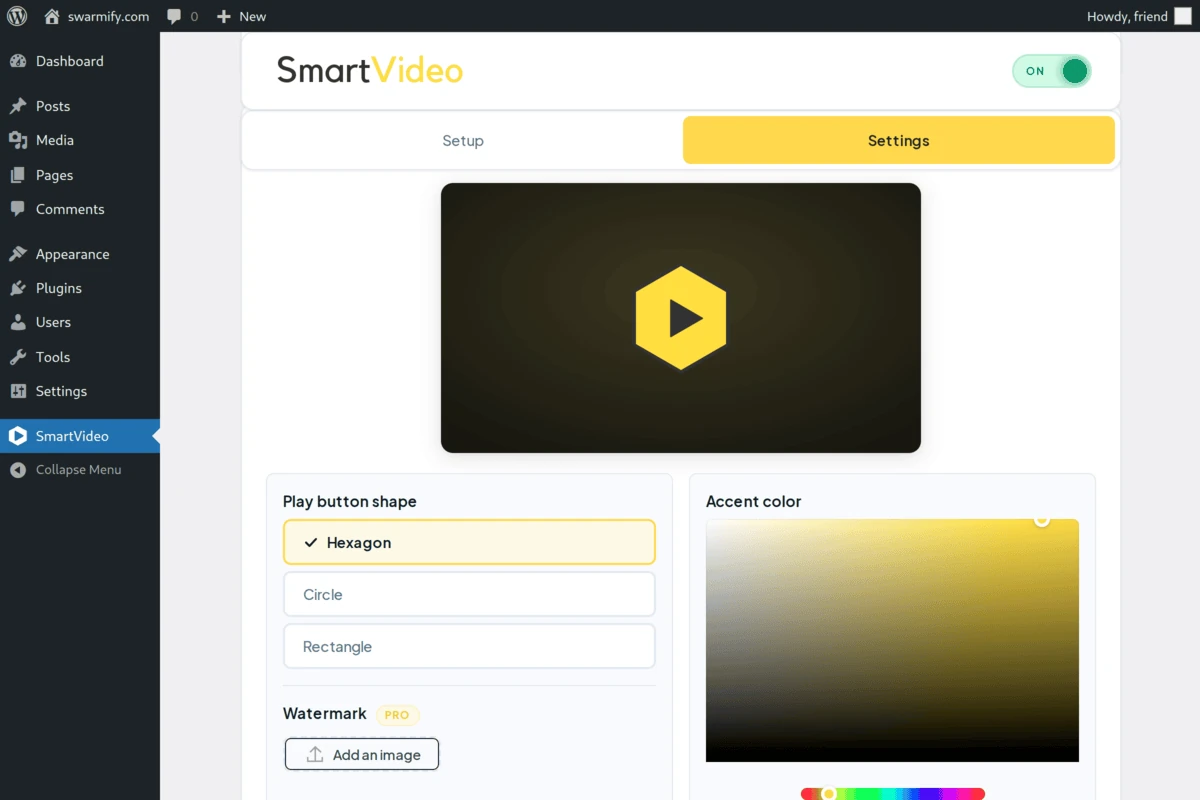
This screenshot shows an older plugin interface; the current plugin shows one button per shape instead.
If you want to manually edit the script in your head tag (not recommended):
Note: this method will not work if you have SmartVideo enabled on your site via our WordPress plugin.
Add this snippet to the SmartVideo script in the head tag of your site:
theme: {button:"rectangle"},or
theme: {button:"circle"},Example configuration:
<script data-cfasync="false">
    var swarmoptions = {
        swarmcdnkey: "YOUR_SWARM_CDN_KEY",
        theme: {primaryColor:"#ffde17", button:"rectangle"},
        iframeReplacement: "iframe",
        autoreplace: {
            youtube: true
        }
    };
</script>
<script async data-cfasync="false" src="https://assets.swarmcdn.com/swarmcdn.js"></script>
While you’re tweaking the look of your player, you can also dial in how strongly your primary color tints the frosted-glass control bar. See Customize player color for the glassTint setting.
Need some help? Give us a shout by clicking the button in the bottom right corner of this page!
Keywords: change button, change play button, customise button, player customise button