
You have spent hours perfectly aligning columns in Beaver Builder, only to drop in a video and watch your page speed tank. Even worse, that video finishes playing and immediately suggests your competitor’s content to your prospect. If you are building a professional website, relying on default video embeds creates a noticeable drop in quality.
📋 TL;DR • The YouTube trap: Standard embeds add 1.3MB of weight and leak traffic to related videos. • The media library risk: Uploading directly to WordPress causes buffering and server strain. • The professional path: Using a dedicated, ad-free host ensures fast playback and keeps viewers on your site. • The integration: SmartVideo provides a native Beaver Builder module for instant, clean video delivery.
Beaver Builder remains a highly capable page builder for WordPress. It is lightweight, stable, and trusted by over a million websites. However, when it comes to delivering video content, the built-in options force you into a corner. You either accept the performance hit of a third-party player or deal with the buffering of self-hosted files.
We see this constantly when auditing WordPress sites. A perfectly optimized layout is undone by a single heavy iframe. Here is how to add video to Beaver Builder without compromising site speed or brand integrity, starting with why the default options fall short.
The Hidden Cost of Default WordPress Video
When you drag the native video module into your layout, you have to choose a source. The two most common choices are the exact ones you should avoid for professional use cases.

The YouTube Performance Tax
Pasting a YouTube link is the default behavior for most WordPress users. It is free, familiar, and works immediately. But if you think YouTube is free, consider the cost of lost traffic. Every time you embed a YouTube player, you are installing a specialized tool designed to pull viewers back to youtube.com.
Beyond the “Related Videos” that appear when paused, standard embeds add significant weight to your page. A default YouTube iframe downloads roughly 1.3MB of JavaScript and tracking scripts on a fully-loaded page (measured against a default Beaver Builder page using the Chrome DevTools Network panel with cache disabled, April 2026 - initial paint runs closer to 600-900KB before the user interacts, then climbs past 1.3MB once the player initializes). If you test your layout in Google PageSpeed Insights, this single element can push your Largest Contentful Paint (LCP) into the red.
You can read more about how an embedded YouTube video affects page load time, but the short version is that it directly conflicts with the lean performance Beaver Builder otherwise provides.
The Media Library Bottleneck
To avoid YouTube’s branding, many site owners try the alternative: uploading MP4 files directly to the WordPress Media Library. This is a structural mistake. Web servers are configured to deliver small text files and optimized images, not stream continuous heavy video data.
When multiple users try to watch a self-hosted video simultaneously, your server’s bandwidth saturates. The result is buffering. A viewer who experiences buffering while watching a video online watches substantially less content than a viewer who does not. For a deeper dive on this, see our guide on why you should never upload video to a WordPress website.
ℹ️ What is the Beaver Builder Video Module? It is a native drag-and-drop element in Beaver Builder that allows you to embed videos via URL or select files from the WordPress Media Library (WP Beaver Builder, 2026).
Why You Need Dedicated Video Hosting
If you cannot use YouTube and you cannot use the Media Library, what is the alternative? A polished, on-brand experience needs ad-free hosting delivered via a Content Delivery Network (CDN). This approach separates the heavy lifting of video streaming from your primary web server.
In 2026, 91% of businesses use video as a marketing tool (Wyzowl, 2026). With that level of saturation, simply having a video is no longer a competitive advantage. Delivery quality is what sets you apart. The same survey finds the majority of video marketers say video gives them a positive return on their investment, which means a buffering player or a YouTube ad before your product demo wastes the production budget that got the video made in the first place.
Dedicated hosting provides:
- Clean playback: No competitor ads or algorithmic distractions.
- Global edge delivery: Videos start instantly regardless of the viewer’s location.
- Adaptive bitrate: The stream adjusts to the user’s connection speed, eliminating the buffering wheel.
You can explore more about ad-free video hosting for websites to understand the underlying mechanics.
🚀 Keep Viewers on Your Site Stop leaking traffic to YouTube’s related videos. SmartVideo delivers a fast, ad-free player directly inside Beaver Builder. Get Faster Video Embeds →
How to Add Professional Video to Beaver Builder
Integrating a professional video solution should not require custom code or shortcode wrangling. With SmartVideo, we built a native integration that sits right inside your familiar Beaver Builder workflow.
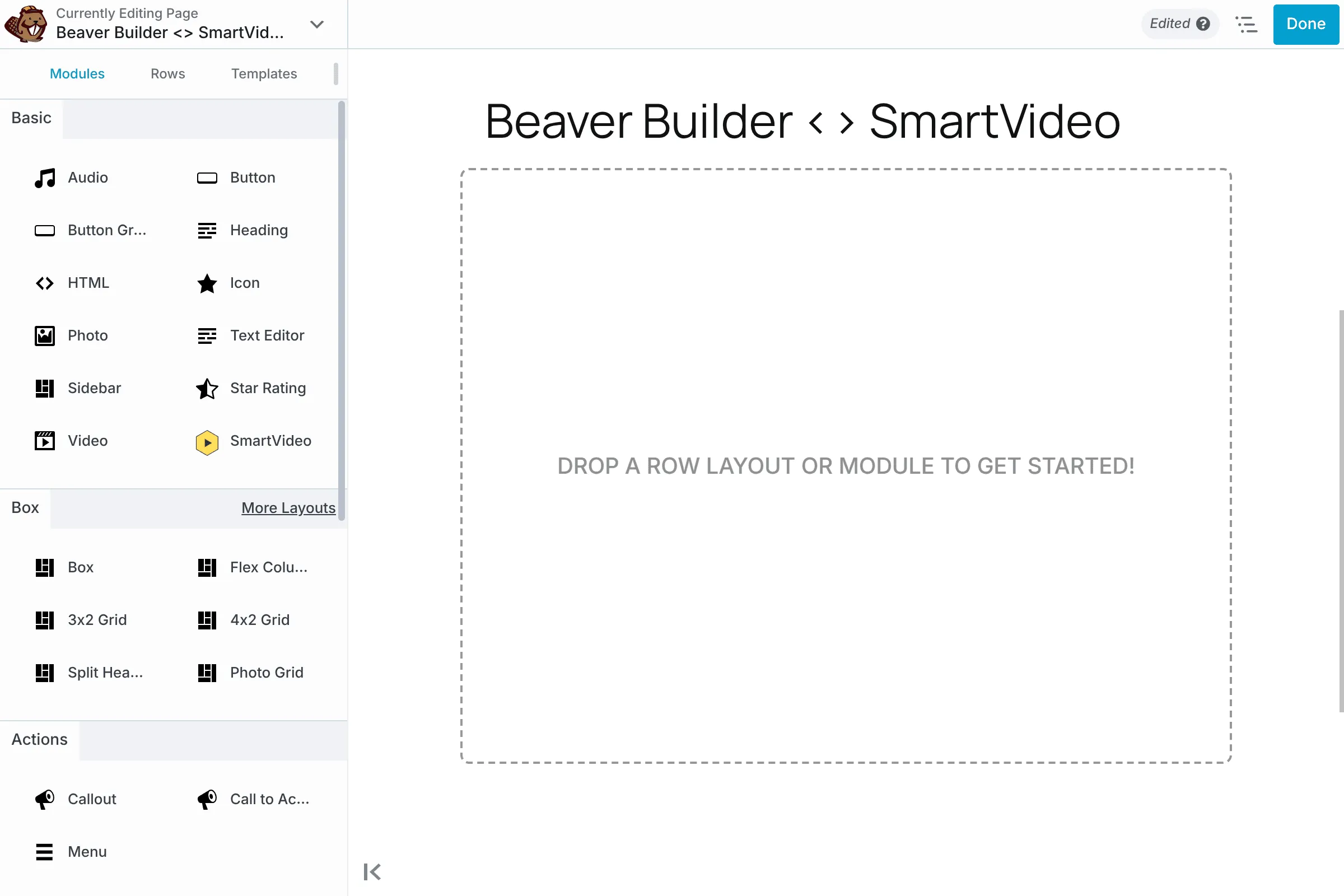
Step 1: Install the Plugin
First, install and activate the SmartVideo plugin from the WordPress repository. Once active, connect it to your Swarmify account. This handles the global CDN configuration automatically, requiring zero technical setup on your end.

Step 2: Drag the Module
Open Beaver Builder on any page. In the modules panel under the “Basic” category, you will now see a dedicated SmartVideo module. Drag this directly into your column structure just like you would a text block or an image.
Step 3: Configure Playback
Click the module to open its settings. Here, you simply paste your video URL. This can be a YouTube link, a Vimeo link, or a raw MP4 file from Dropbox or Amazon S3. SmartVideo automatically fetches the file, encodes it into multiple resolutions, and serves it through our edge network.
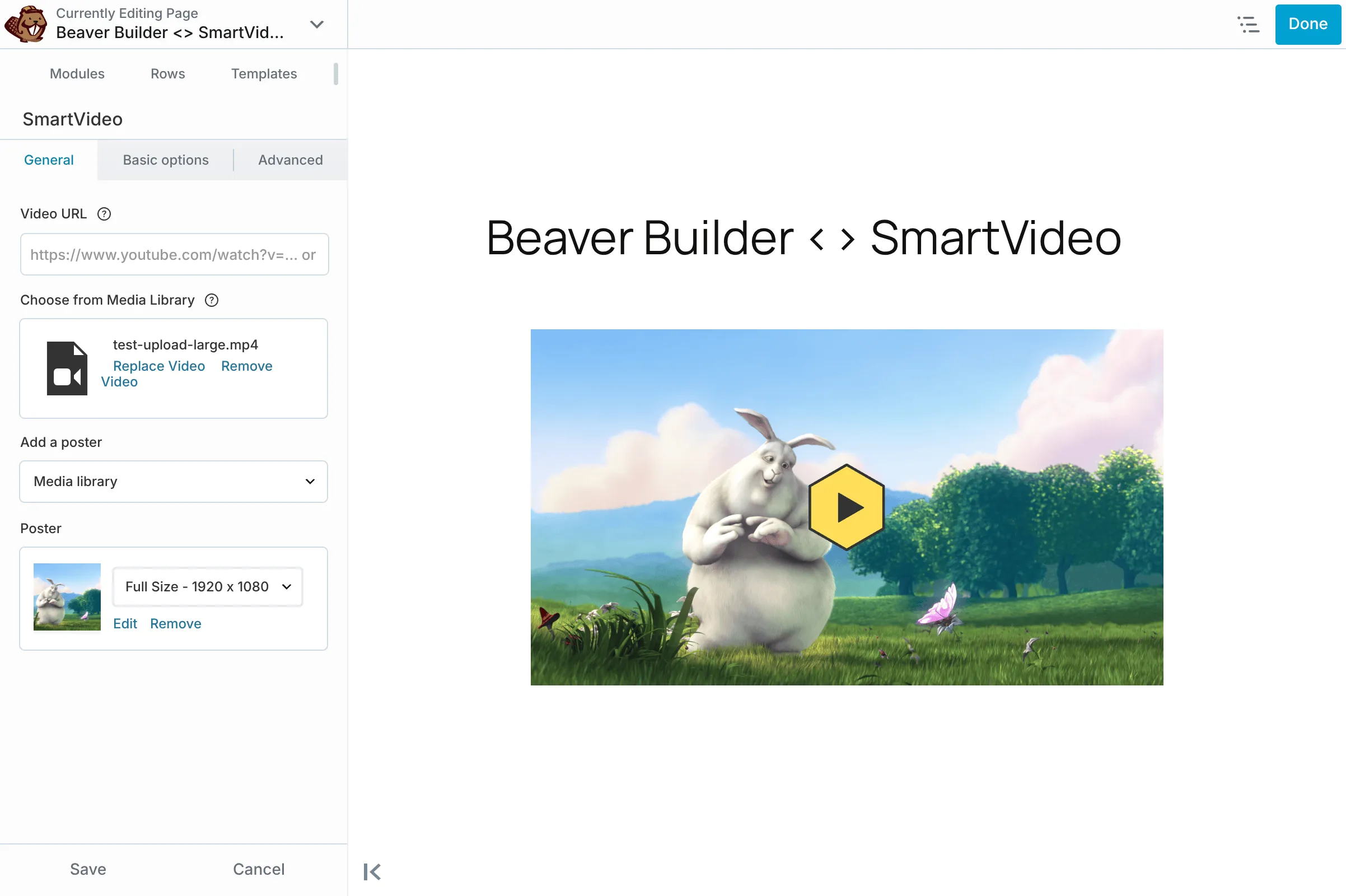
You can adjust autoplay, muting, and looping directly within the Beaver Builder interface. The result is a clean, branded player that loads in milliseconds.
Lightbox and Sticky Video Behavior
Two behaviors Beaver Builder users frequently ask about: opening videos in a lightbox modal and pinning a sticky player to the corner of the screen as visitors scroll. Neither is a single checkbox on the standard Video module, but both are achievable with SmartVideo in place.
Lightbox triggers: Pair the SmartVideo module with Beaver Builder’s Button or Photo module set to a “Lightbox” link target. Because SmartVideo lazy-loads the player, the page paint stays clean and the actual video assets only initialize when the visitor opens the modal. You do not pay the bandwidth cost on visitors who never click play.
Sticky-on-scroll: Place the SmartVideo module in its own column, then add a one-line CSS rule to that column’s class: position: sticky; top: 80px;. The lightweight player stays anchored to the top of the viewport as the rest of the layout scrolls past, without the layout-shift hit you would get from a full YouTube iframe pinning itself in place.
Comparing Your Options
When deciding how to handle video in your page layouts, seeing the structural differences helps clarify the choice. The table below covers both performance characteristics and the practical decision points (cost, captions, bandwidth) most teams weigh during procurement.
| Feature | YouTube Embed | WP Media Library | SmartVideo |
|---|---|---|---|
| Ad-Free Playback | No | Yes | Yes |
| Prevents Buffering | Yes | No | Yes |
| Beaver Builder Integration | Native Module | Native Module | Custom Module |
| Pricing Model | Free (ad-supported) | Included with hosting | Paid subscription |
| Captions Support | Auto + manual | Manual VTT only | Manual VTT upload |
| Bandwidth Limits | None for viewers | Capped by host plan | Per-plan tiers |
If you are exploring other page builders, you will find similar constraints. For example, our approach to Elementor video hosting follows the same philosophy of replacing heavy default embeds with optimized, native modules.
Final Thoughts on Video Delivery
A visitor who lands on a page built carefully in Beaver Builder expects the video player to match that level of polish. Relying on YouTube turns your site into a billboard for unrelated videos, while self-hosting leaves viewers staring at a buffering wheel until they give up and bounce.
Switching to a dedicated video CDN like SmartVideo gives you back control over the user experience. Pages load faster, branding stays intact, and viewers keep their attention on your message instead of YouTube’s recommendation feed. Setup takes minutes, and the speed gains hold up as your library grows.
Frequently Asked Questions
How do I add a video to Beaver Builder?
You can add a video to Beaver Builder by dragging the native Video module into your layout and pasting a URL or selecting a file from the Media Library. For a faster, ad-free experience, you can install the SmartVideo plugin and use its dedicated module instead. (WP Beaver Builder, 2026)
Can I use YouTube videos in Beaver Builder?
Yes, you can paste a YouTube URL directly into the standard Video module. However, doing so will display YouTube’s related videos when the video pauses or ends, potentially drawing visitors away from your website. (YouTube Help, 2026)
Does embedding YouTube videos slow down Beaver Builder?
Yes, standard YouTube embeds add roughly 1.3MB of JavaScript and tracking code to your page load. This can significantly hurt your Core Web Vitals scores, especially on mobile devices. (Google PageSpeed Insights, 2026)
What is the best video hosting for Beaver Builder websites?
The ideal video hosting for Beaver Builder avoids injecting third-party ads while providing a global Content Delivery Network to prevent buffering. Commercial video hosting solutions typically offer more control over branding and player customization than free platforms. (Wyzowl, 2026)
How do I make a video background in Beaver Builder?
To create a video background, edit a Row’s settings, change the Background Type to Video, and provide an MP4 URL or a YouTube link. Keep in mind that background videos should be short, muted, and heavily compressed to avoid slowing down the page rendering. (WP Beaver Builder, 2026)
Why is my Beaver Builder video buffering?
If your video is hosted in the WordPress Media Library, it buffers because standard web servers are not optimized for streaming continuous data. To fix this, you should serve the video file through a dedicated video CDN that uses adaptive bitrate streaming so the quality automatically scales to each viewer’s connection.


