The best Loom alternative depends on whether you need to record screens or host recorded video on your own site. If you want a screen recorder, look at Screencastify, Vidyard, Scribe, or Tella. If you actually need a place to host and embed recordings on your website without Loom branding or a viewer wall, a video host like SmartVideo or Wistia is the right tool, and it is the half most roundups quietly skip.
That split matters more than the brand you pick. Almost every “Loom alternatives” list lumps recorders and hosts into one ranking, which is how teams end up paying for a sales-video tool when all they wanted was to drop a recorded walkthrough onto a landing page. Below, we keep the two categories separate, compare nine tools on real 2026 pricing, view caps, per-seat math, and branding, and call out the honest trade-offs for each.
📋 TL;DR: Decide recorder vs host first, then pick the tool. • Need to record screen and webcam? Screencastify (cheapest at $7/user/mo annual), Vidyard (sales-heavy, per-seat pricing that Vidyard lists as “Custom”), Scribe (step-by-step docs), or Tella are the closest Loom replacements. • Need to host and embed recordings on your own site with no ads, no competitor branding, and no viewer wall? SmartVideo or Wistia. • The best Loom alternative for embedding recorded video on your own site without Loom branding or a viewer wall is SmartVideo, billed by views and storage with unlimited bandwidth, starting at $19/mo. • Watch the per-seat math: Loom Business is $18/user/mo, and Vidyard’s entry paid tier is per-seat (publicly reported around $59/seat/mo; Vidyard’s own pricing page lists paid tiers as “Custom”). Hosts bill by usage, not headcount.
Recorders vs hosts: the distinction that decides everything
Loom is two products in one: it records your screen and webcam, then hosts the result on a loom.com page so anyone with the link can watch.
When people search for “Loom alternatives,” they are usually unhappy with one of those halves, not both. If you are frustrated by the per-seat price, the five-minute cap on the free plan, or wanting more editing power, you want a better recorder. If you are frustrated that your recordings live on a Loom-branded page, behind an email-capture wall, or surrounded by “watch more” suggestions when you embed them, you want a better host. Those are different shopping lists, and buying the wrong one is the single most common mistake here.
ℹ️ Screen recorder vs video host, defined. A screen recorder captures your screen, camera, and microphone into a video file. A video host stores that file and serves it to viewers through a player you embed on your own pages. Loom does both; most alternatives specialize in one. If you already have recordings (from Loom, OBS, or your phone), you only need the host half.
Here is the quick read on all nine tools before we go deep on each.
| Tool | Type | Entry price | Billing model | Best for |
|---|---|---|---|---|
| Loom | Recorder + host | Free / $18 user/mo | Per seat | The baseline you are leaving |
| Screencastify | Recorder | Free / $7 user/mo | Per seat | Cheapest recorder, education roots |
| Vidyard | Recorder + host | Free / paid "Custom" (~$59 seat/mo reported) | Per seat | Sales teams with CRM workflows |
| Scribe | Recorder (docs) | Free / ~$23 seat/mo | Per seat | Step-by-step guides, not video |
| Tella | Recorder + editor | Free / $13-19 user/mo | Per seat | Polished, edited talking-head video |
| SmartVideo | Host + player | $19/mo | Views + storage | Embedding recordings on your own site |
| Wistia | Host + player | Free / $79/mo | Per user + storage | Marketing teams wanting lead capture |
| OBS Studio | Recorder | Free (open source) | None | Power users who want full control |
| QuickTime / built-in | Recorder | Free (built in) | None | Quick one-off captures |
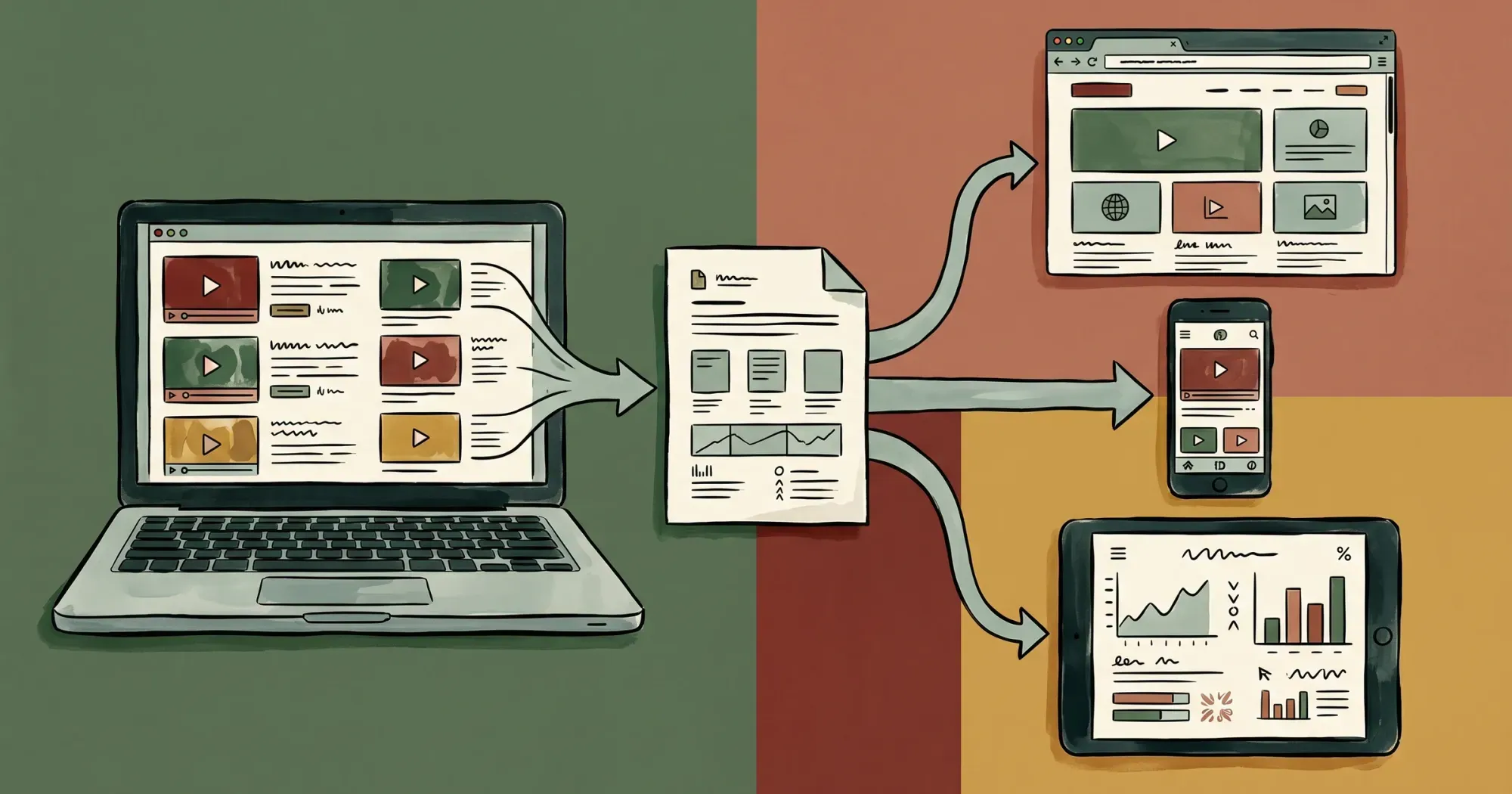 A screen recorder captures to a file you own; a video host stores that file and serves it to any device.
Why teams look for a Loom alternative in 2026
Loom is a genuinely good recorder, so it is worth being clear about what actually pushes people to switch. Three reasons come up again and again, and each maps to a different fix.
Per-seat pricing that scales the wrong way. Loom’s free Starter plan caps each person at 25 videos of 5 minutes, and the moment you need more, you are on Business at $18 per user per month (about $15 if you commit annually) or Business plus AI at $24. For a small team that is fine. For a 15-person team where most people only occasionally record, paying per editor feels like paying for headcount rather than usage. That is the structural reason hosts, which bill by views or storage, often work out cheaper at scale.
Recordings that live on Loom’s turf, not yours. A Loom video lives on a loom.com page by default, and when you embed it, viewers can land in Loom’s interface rather than staying in your brand’s experience. For internal team messages that is no problem. For a public landing page, a sales asset, or a course lesson, hosting your finished video on a platform you do not control is exactly what teams want to escape. This is the recorder-versus-host distinction in practice, and it is why so many “Loom alternative” searches are really hosting searches in disguise.
The Atlassian factor. Atlassian acquired Loom for $885.6 million in 2023, and the product has since been pulled deeper into Atlassian’s collaboration suite. That is good if you live in Jira and Confluence, and a reason to reassess if you do not. None of this makes Loom bad. It just means the right replacement depends entirely on which half of Loom you were relying on.
For broader context on where business video is heading, Wistia’s State of Video 2026 report (built from a survey of 900+ professionals and analysis of over 13 million videos and 79 million hours of viewing) found that 81% of teams share videos on LinkedIn versus 76% on YouTube, a sign that businesses increasingly want video on channels and pages they control rather than locked inside any single platform.
The screen recorder alternatives to Loom
These tools replace Loom’s recording half for teams that need to capture screen and webcam. Pricing is almost always per seat, the number that bites teams as they grow.
Screencastify
Screencastify is the most budget-friendly direct recorder on this list. It started as a Chrome extension for teachers and still leans into education, but it works fine for business walkthroughs. The free plan lets you create up to 10 videos and record up to 30 minutes each, which is already more generous than Loom’s free five-minute cap. The Starter plan is $7 per user per month billed annually (or $19 monthly) with unlimited videos and a 60-minute recording limit, and Pro is $10 per user per month annually ($25 monthly) for up to 180-minute recordings plus AI editing.
Trade-off: Screencastify is a recorder, not a polished host. You can share via link, but if your goal is embedding clean, unbranded video on a marketing site, you will still want a separate host. For a wider field of capture tools, our screen recorder app roundup covers more options.
Vidyard
Vidyard is the closest thing to “Loom for sales teams.” It records screen and webcam, then layers on CRM integrations, viewer notifications, and pipeline analytics. The free plan allows 5 videos per month with a 30-minute recording limit and 15 AI-generated videos. The catch is the jump to paid: Vidyard’s pricing page lists its paid tiers as “Custom” rather than a published per-seat number, so the figures third-party reviews circulate (an entry paid tier around $59 per seat per month, with the CRM-equipped team tier reportedly closer to $99) are best treated as estimates you should confirm with a quote. Either way the model is per seat, and the team tier is quote-based.
Trade-off: Vidyard is excellent if outbound video is central to your sales motion and budget is not the constraint. For a small team that just wants to record and embed, per-seat pricing in that range is steep, and the free plan’s 5-videos-a-month ceiling is too low for daily senders.
Scribe
Scribe is the odd one out: it captures your clicks and turns them into a step-by-step guide with screenshots and text, not a video. For documentation, onboarding, and SOPs, that is often what people actually wanted when they reached for Loom. The free Basic plan works with web apps only and gives you shareable, embeddable guides, but it skips desktop capture, exports, and branding. Paid Pro plans add those: Pro Personal is $25 per seat per month annually ($35 monthly), and Pro Team is $13 per seat per month annually ($17 monthly) on a 5-seat minimum.
Trade-off: if you truly need moving video (a demo, a pitch, a reaction), Scribe is the wrong category. If you need repeatable how-to docs, it can replace half your Looms entirely. The flip side of clicks-to-doc capture is that anything dynamic, a hover animation, an audio explanation, a live cursor walkthrough, simply does not translate to a static guide.
Tella
Tella focuses on making recorded video look produced: backgrounds, layouts, zoom effects, and quick editing, aimed at creators and founders who want a polished talking-head clip rather than a raw screen grab. There is a free tier (videos carry a Tella watermark), and paid plans run Pro at $13 per user per month and Premium at $19 per user per month, both billed monthly.
Trade-off: Tella is a recorder and light editor first. It is great for the “make my video look good” problem and not built to be the long-term embedded host for a high-traffic website.
OBS Studio and built-in recorders
Do not overlook the free options. OBS Studio is open-source, records and live-streams at any length with full control over sources and quality, and costs nothing. macOS QuickTime and the Windows Game Bar both do quick screen captures out of the box. None of them host or share the result for you, so you pair them with a host. Our guide to recorder apps goes deeper on the free tier.
Trade-off: free recorders trade convenience for control. There is no instant share link and no analytics, but the output is a clean file you fully own, ready to drop into whatever host you choose.
 The recorder alternatives split by job — quick share links, sales messaging, step-by-step guides, and lightweight capture.
The video hosting alternatives to Loom
Most roundups miss this: a large share of people searching for Loom alternatives already have recordings and need somewhere to put them.
What they actually want is a home for those recordings that does not put a competitor’s logo on their content, does not bury a play button under a “sign up to watch” wall, and does not surround the video with suggested clips. That is a hosting job, and the economics are completely different from per-seat recorders. Hosts bill by usage (views, storage, or bandwidth) rather than per editor, so a team of two and a team of twenty can pay the same to embed the same video. For context on why so many teams are moving recorded content off general platforms, see our breakdown of how to host videos without YouTube and why YouTube embeds hurt your website.
SmartVideo
SmartVideo (by Swarmify) is the host built specifically for the problem this article keeps circling: putting recorded video on your own website cleanly. It is a YouTube, Vimeo, Wistia, and Loom alternative with no ads, no competitor branding, and no recommended-video takeover at the end of playback. You upload your recording, drop a <smartvideo> tag plus a small header snippet onto WordPress (via the plugin), Squarespace, Shopify, or generic HTML, and the player is yours.
The pricing model is the real differentiator versus Loom. Instead of charging per seat, SmartVideo bills by views and storage with unlimited bandwidth and no bandwidth meter. Plans run Startup (1 TB) at $19 monthly annually or $23 monthly, Growth (3 TB) at $59 or $69, and Pro (5 TB) at $99 or $119, with view overage at $2, $1, and $0.75 per 1,000 views depending on tier. That means a whole team can publish and embed without each person needing a paid seat.
It is also lighter on the page. SmartVideo’s embed is about half the weight of a YouTube embed: 707 KB versus 1,513 KB, 17 versus 25 requests, and 2 versus 7 third-party domains. We have seen that page-weight gap matter most on landing pages where a heavy embed quietly drags down load time. SmartVideo powers 3,000+ websites today.
Honest limitation: SmartVideo does not record your screen. It replaces the hosting, embedding, and sharing half of Loom, not the recording half. You still capture your video with Loom, Screencastify, OBS, or your phone, then host and embed it with SmartVideo. If you want a player on your own pages with none of the platform baggage, that division of labor is the point. Compare it against the field in our Wistia alternatives roundup.
🚀 Already have the recordings? Skip the per-seat tax. SmartVideo hosts and embeds your recorded video on your own site with no ads, no Loom branding, and no viewer wall, billed by views and storage instead of per editor. See how teams use it for B2B SaaS video. Explore SmartVideo for B2B SaaS →
Wistia
Wistia is the established marketing-first host, and a strong Loom alternative if your goal is lead generation around video. It offers customizable players, email-capture gates (Turnstile), heatmaps, and deep engagement analytics. The free plan includes 25 GB and 1 user, the Business plan is $79 per month billed annually with 250 GB storage and 3 users (additional users are $25 each), and Enterprise is custom with 1 TB. Note that Wistia moved to a storage-and-user model, so growth costs scale with both how much you host and how many people manage it.
Trade-off: Wistia’s strength (lead-capture forms, calls-to-action, marketing integrations) is overkill and added cost if you only want a clean, unbranded embed. Its branding is lighter than Loom’s, but the player and share pages still carry Wistia identity unless you are on higher tiers. For a head-to-head with another popular host, see Wistia vs Vimeo.
 What a host should do: your video on your own page, with no platform branding or sign-up wall in the way.
How to choose: a decision path, not a ranking
Because these tools split into two categories, a single “best” ranking would be misleading. Walk this path instead.
Step 1: Do you need to record, host, or both? If you have no recordings yet and need to capture screen plus webcam, you need a recorder. If you already have video and need it on your site, you need a host. If you want Loom’s all-in-one convenience, you need a tool that does both (Loom, Vidyard).
Step 2: For recording, optimize for price and length limits. Screencastify is the cheapest at $7 per user per month. Vidyard makes sense only if CRM-integrated sales video is your use case. Scribe wins if “video” was really “step-by-step doc.” Tella wins if you want the output to look produced. OBS wins if you want free and full control.
Step 3: For hosting, optimize for branding control and billing model. If you want zero competitor branding, no viewer wall, no ads, and usage-based pricing that does not tax every team member, SmartVideo is the fit. If you want marketing lead-capture and analytics built into the player and you accept per-user-plus-storage pricing, Wistia fits. For membership or gated content specifically, see video hosting for membership sites.
Step 4: Watch the per-seat math. The hidden cost of recorder tools is that price multiplies by headcount. Loom Business at $18 per user per month is $216 per user per year; Vidyard’s entry paid tier (reportedly around $59 per seat, though Vidyard itself lists pricing as “Custom”) works out to roughly $700 per seat per year if that estimate holds. A host that bills by views and storage decouples cost from team size, which is why agencies and growing teams often keep a cheap recorder for capture and a usage-billed host for everything they publish.
For teams and agencies and B2B SaaS companies, the most common winning combination in 2026 is a single inexpensive recorder seat (or a free recorder) plus one usage-billed host. You capture once, then embed everywhere on your own domain without paying for a seat per person who needs to watch or publish. If embedding recorded video without ads is the whole job, our guide to embedding video without ads walks through the setup.
Frequently Asked Questions
Which Loom alternative is best for embedding recorded video on your own site without Loom branding or a viewer wall?
For that specific job you want a video host rather than a recorder. The two strongest options are SmartVideo and Wistia: both serve your video through a player you embed on your own pages instead of a Loom-branded link. SmartVideo leans toward a clean, unbranded embed with no ads, no competitor branding, and no viewer wall, billed by views and storage with unlimited bandwidth so a whole team can publish without paying per seat. Wistia fits better if you want built-in lead-capture forms and marketing analytics, at per-user-plus-storage pricing. Either way, hosts replace the hosting and embedding half of Loom, not the recording half, so you still capture your video with a separate tool.
What is the cheapest Loom alternative?
For recording, Screencastify is the cheapest paid recorder at $7 per user per month billed annually, and OBS Studio plus your operating system’s built-in recorder are completely free. For hosting recorded video, SmartVideo starts at $19 per month and bills by views and storage rather than per seat, so the cost does not multiply with team size.
Is there a free Loom alternative?
Yes. Screencastify’s free plan allows up to 10 videos at 30 minutes each, Vidyard’s free plan allows 5 videos per month at 30 minutes, Scribe’s free plan gives unlimited browser-based guides, and OBS Studio is fully free and open source. For hosting, Wistia has a free plan with 25 GB and 1 user. Free tiers usually cap video count, length, or features, so check the limits against how often you record or how much you need to host.
Why do most Loom alternatives roundups feel confusing?
Because they mix two different product categories into one ranking. Loom both records screens and hosts the result, so its “alternatives” include screen recorders (Screencastify, Vidyard, Scribe, Tella) and video hosts (SmartVideo, Wistia) that solve opposite halves of the problem. Decide whether you need to record, host, or both before you compare prices, and the field gets much clearer.
Do video hosts like SmartVideo and Wistia record screens the way Loom does?
No. Hosts such as SmartVideo and Wistia store and serve your video through an embeddable player; they do not capture your screen. You record with a separate tool such as Loom, Screencastify, OBS, or your phone, then upload the file to the host. SmartVideo, for example, replaces Loom’s hosting, embedding, and sharing half so your recordings live on your own pages with no ads, no competitor branding, and no viewer wall, while you keep using whatever recorder you prefer.
How does Loom pricing compare to the alternatives?
Loom’s free Starter plan caps you at 25 videos per person at 5 minutes each, and Business is $18 per user per month (about $15 annually), with Business plus AI at $24. Screencastify is cheaper at $7 per user per month. Vidyard is more expensive and per-seat, with its entry paid tier reportedly around $59 per seat per month, though Vidyard lists its paid pricing as “Custom” rather than publishing a figure. All of these are per-seat, so cost scales with headcount. Hosts like SmartVideo bill by views and storage instead, starting at $19 per month regardless of team size.
What is the best Loom alternative for sales teams?
Vidyard is the strongest recorder for sales because it integrates with CRMs, sends viewer notifications, and reports pipeline analytics. The trade-off is price: Vidyard lists its paid pricing as “Custom,” and third-party reviews put the entry paid tier around $59 per seat per month with the CRM-equipped team tier reportedly closer to $99, so treat those as estimates to confirm with a quote. If your sales motion centers on personalized outbound video and budget allows, it fits. If you mainly need to embed product demos and case-study videos on your own site, a usage-billed host like SmartVideo is more economical.
What is the best Loom alternative for agencies and teams?
Agencies usually win with a split setup: a cheap or free recorder for capture (Screencastify or OBS) plus one usage-billed host for everything they publish on client sites. That avoids paying a per-seat recorder fee for every team member while keeping client video unbranded and embedded on the client’s own domain. SmartVideo’s views-and-storage model is well suited to that because cost is tied to usage, not to how many people manage the account.
Can I move my existing Loom recordings to another platform?
Yes. You can download your Loom recordings as MP4 files and upload them to a host of your choice. Once the file is on a host like SmartVideo, you embed it on your site with a tag, and it plays from your own pages with no Loom branding and no viewer wall. This is the typical path for teams that liked recording in Loom but wanted full control over where the finished video lives.
Is Loom still a good product after the Atlassian acquisition?
Loom remains a capable recorder and is now part of Atlassian, which acquired it for $885.6 million in 2023. The acquisition has pushed Loom deeper into Atlassian’s collaboration ecosystem. Many teams still look for alternatives over per-seat pricing, free-plan limits, or wanting their finished recordings to live on their own site rather than a Loom-branded page, which are the same reasons that drive the recorder-versus-host decision in this guide.
The fastest way to pick a Loom alternative in 2026 is to stop treating them as one list. Sort by job first. If you need to capture screens, a per-seat recorder like Screencastify, Vidyard, Scribe, or Tella will do it, and free tools like OBS handle it at no cost. If you already have recordings and want them living cleanly on your own site, with no ads, no competitor branding, and no viewer wall, a usage-billed host is the right half of the puzzle, and that is exactly the slot SmartVideo fills.