
Why YouTube Embeds Hurt Your Website (2026)
YouTube embeds add 1.3-2.6 MB to your page, hurt Core Web Vitals, leak traffic through related videos, and create GDPR headaches. Learn what's really happening and how to fix it.


• Page weight: A single YouTube embed adds 1.3-2.6 MB to your page and makes 20+ HTTP requests—before your visitor even clicks play.
• Core Web Vitals: YouTube embeds hurt LCP and FID scores, which directly affect your Google rankings.
• Traffic leaks: Related videos and "Watch on YouTube" links actively pull visitors away from your site.
• Privacy compliance: Standard embeds set tracking cookies immediately, creating GDPR headaches.
• The fix: Use lazy loading, facades, or a dedicated video hosting solution to keep the benefits without the downsides.
You've probably embedded a YouTube video on your website at some point. It's easy—copy the embed code, paste it into your page, done. Free hosting, free bandwidth, and you get to tap into the world's second-largest search engine.
Sounds like a no-brainer, right?
Here's the problem: that "free" video player comes with hidden costs that can undermine your website's performance, user experience, and even your business goals. And in 2026, those costs have gotten more significant as Core Web Vitals became a ranking factor and privacy regulations tightened.
Let me break down exactly what happens when you embed a YouTube video on your site—and what you can do about it.
The Performance Problem: What YouTube Embeds Actually Load
When you paste a YouTube embed code onto your page, you're not just adding a video player. You're loading an entire ecosystem of scripts, stylesheets, fonts, and tracking mechanisms that YouTube needs to function.
Here's what happens the moment your page loads:
| Resource Type | Approximate Size | Purpose |
|---|---|---|
| JavaScript files | 500-900 KB | Player functionality, analytics, ads |
| CSS stylesheets | 50-100 KB | Player styling |
| Fonts | 100-200 KB | YouTube's custom fonts |
| Thumbnail images | 100-300 KB | Video preview |
| Tracking scripts | 100-200 KB | DoubleClick, Analytics |
| Total per embed | 1.3-2.6 MB |
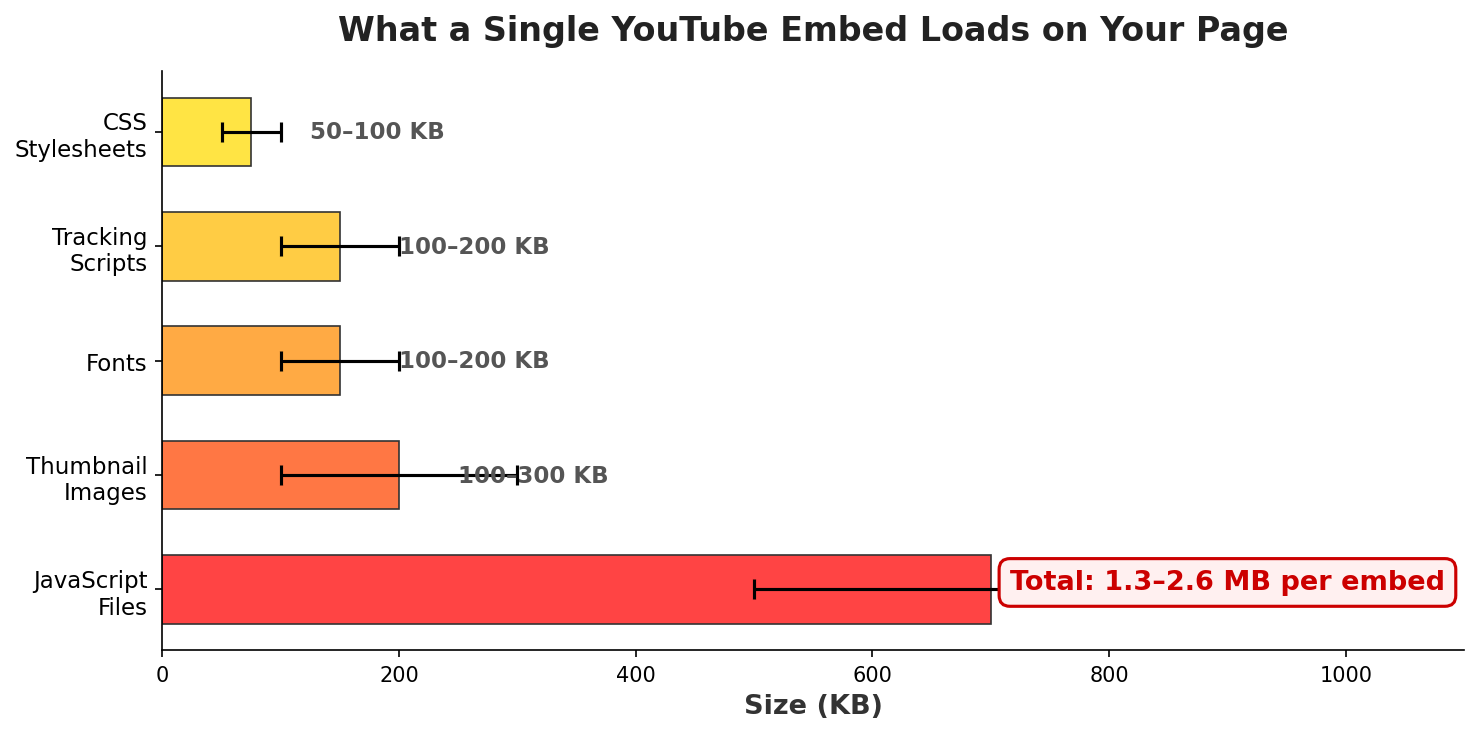
According to Frontend Masters, a standard YouTube embed adds approximately 1.3 MB to your website—and that weight grows linearly with every additional embed. Two videos? That's 2.4 MB. Three? 3.6 MB. Resources aren't shared between embeds.
The browser also has to make 20+ HTTP requests to render the YouTube player. For context, many entire web pages have fewer requests than a single YouTube embed.
And here's the part that really hurts: all of this loads whether your visitor watches the video or not. The moment your page loads, YouTube's JavaScript executes, cookies are set, and resources are downloaded. Your visitor hasn't clicked play. They might not even scroll down to see the video. Doesn't matter—the damage to your page speed is already done.
How YouTube Embeds Tank Your Core Web Vitals
If you've been paying attention to SEO in the past few years, you know that Core Web Vitals are now a Google ranking factor. These metrics measure real-world user experience:
- Largest Contentful Paint (LCP): How long until the main content is visible (target: under 2.5 seconds)
- Interaction to Next Paint (INP): How responsive the page is to user input (target: under 200ms)
- Cumulative Layout Shift (CLS): How much the page layout shifts during loading (target: under 0.1)
According to Google's official documentation, these metrics measure real-world user experience based on actual visitor data. For a deeper dive into the technical details, web.dev's Core Web Vitals guide explains how each metric is calculated.
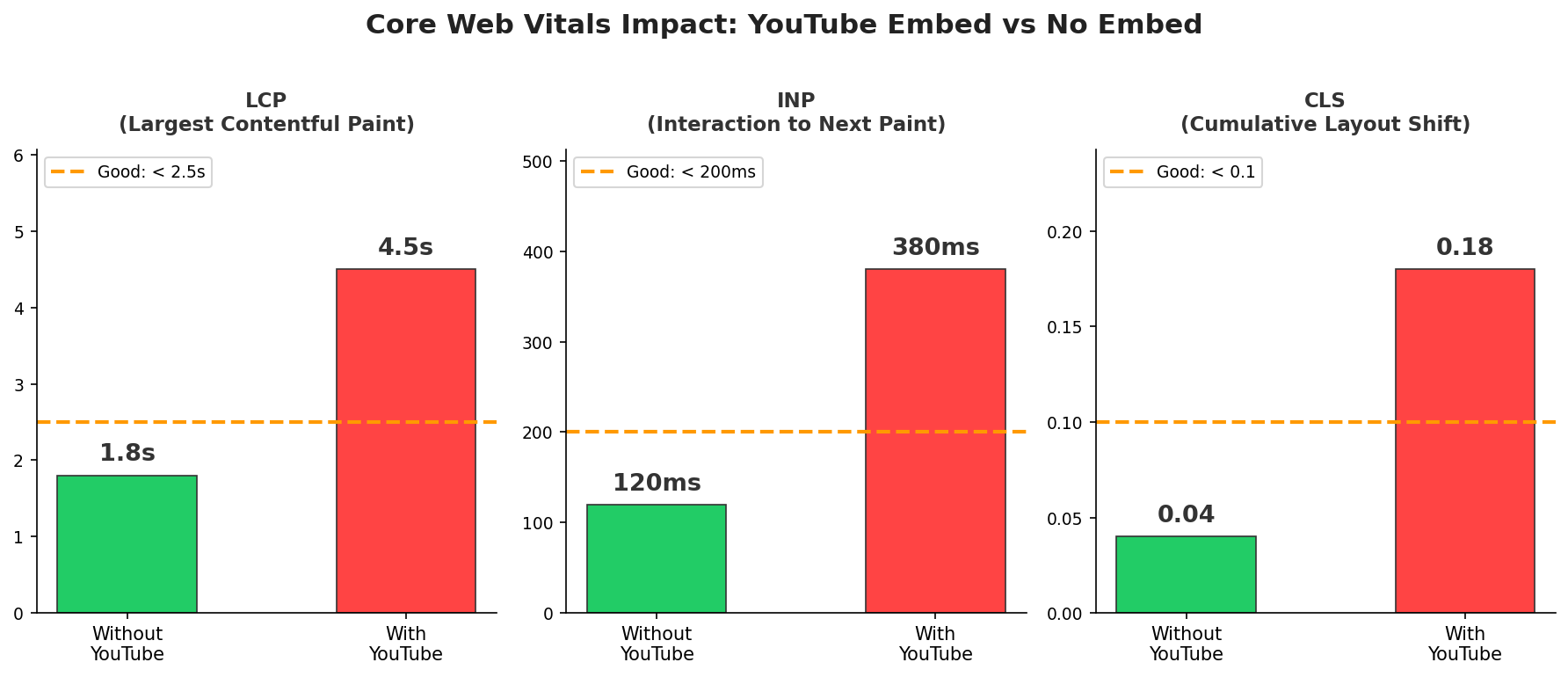
YouTube embeds can hurt all three:
LCP suffers because YouTube's iframe and resources compete for bandwidth with your actual content. The browser is busy loading YouTube's half-megabyte of JavaScript instead of rendering your page.
As research on YouTube embeds and page load time has shown, around half of users expect a web page to load in 2 seconds or less. According to Cloudflare's analysis, a site that loads in 1 second has a conversion rate 3x higher than one loading in 5 seconds. Portent's research found that pages loading in 1 second achieve 39% conversion rates versus just 18% for 6-second loads. YouTube's heavyweight embed code directly contributes to this problem.
FID/INP suffers because JavaScript execution blocks the main thread. As web.dev's guide to third-party scripts explains, heavy third-party iframes like YouTube compete for main thread time. While YouTube's scripts are running, your page can't respond to user clicks or scrolls. This creates that frustrating "laggy" feeling users experience on slow sites.
CLS suffers when the YouTube player's dimensions aren't explicitly set or when the iframe loads after other content, causing elements to shift around.
Google's John Mueller has acknowledged that embedded videos can slow pages down, but advises weighing this against the ranking benefits of having video content. The trick is finding a way to get the benefits without the performance penalties.
The Traffic Leak: How Related Videos Steal Your Visitors
Performance is only half the problem. The other half is what YouTube does after your video plays.
You've seen it: your video ends, and suddenly there's a grid of "related videos" plastered across the player. These are algorithmically chosen by YouTube to maximize their engagement—not yours. Your competitor's video might appear. A random cat video might appear. Either way, one click and your visitor is gone, whisked away to YouTube.com, probably never to return.
As we've discussed in our analysis of YouTube embed pros and cons, YouTube's primary goal in allowing you to embed videos is to funnel users back to their platform. And they're very good at it.
Here's what makes it worse: you can't fully disable related videos anymore.
Before September 2018, adding rel=0 to your embed code would completely remove related videos. YouTube killed that feature. According to YouTube's official embed documentation, rel=0 now only limits suggestions to videos from your own channel—it doesn't turn them off. There is literally no parameter that disables suggested videos in 2026.
| Embed Parameter | What It Actually Does (2026) |
|---|---|
rel=0 |
Limits related videos to your channel only (does NOT disable) |
modestbranding=1 |
Deprecated—no longer works |
controls=0 |
Hides player controls (but related videos still appear) |
showinfo=0 |
Deprecated—no longer works |
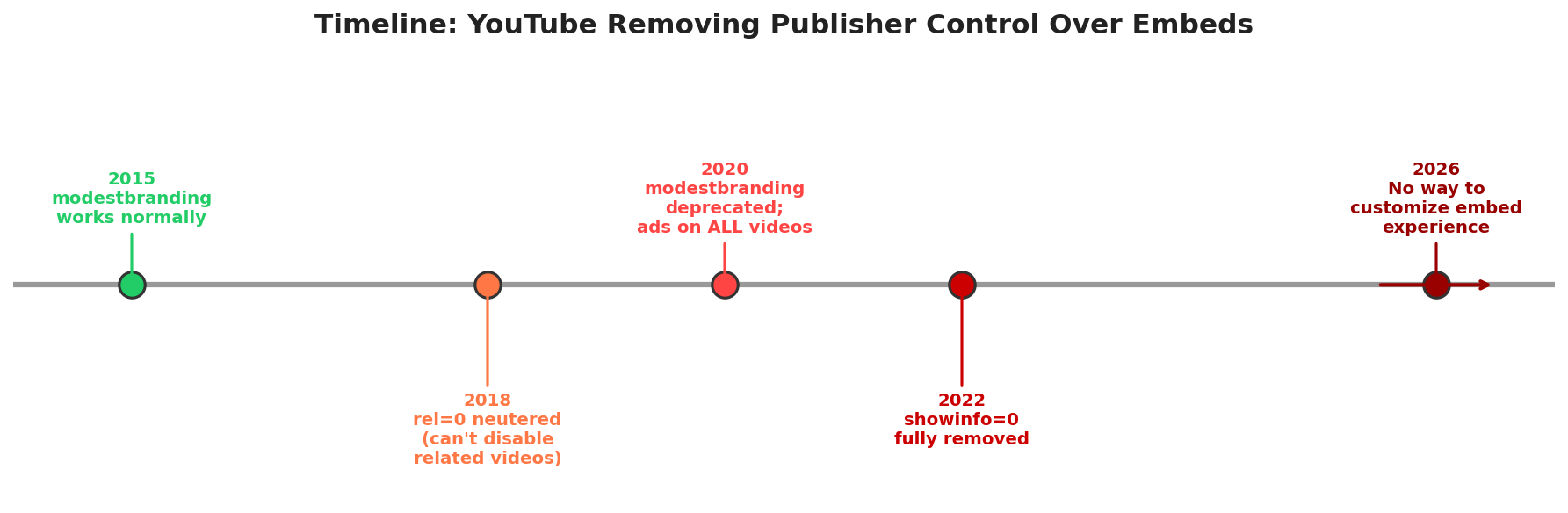
YouTube has systematically removed ways for publishers to control the embed experience. They've made their priorities clear: their platform engagement matters more than your website's user experience.
This matters for your business because every visitor who clicks through to YouTube is a potential customer lost. As we've explored in why YouTube isn't really free, the cost of "free" hosting is paid in lost conversions and leaked traffic.
The Privacy Problem: GDPR and Tracking Cookies
If you have visitors from the European Union—or California, or increasingly anywhere—you need to think about privacy compliance.
Standard YouTube embeds set tracking cookies the moment the page loads, before the user does anything. These include:
- DoubleClick cookies: Used for ad targeting across the web
- YouTube tracking cookies: Used for recommendations and analytics
- Google Analytics cookies: Used for cross-site tracking
Under GDPR, you need explicit user consent before setting non-essential cookies. The EU's official guidance is clear: consent must be freely given, specific, informed, and unambiguous—and it must happen before cookies are set. As GDPR.eu explains, this means a standard YouTube embed violates GDPR the instant your page loads—before your cookie consent banner even appears.
You might think, "I'll just use YouTube's Privacy-Enhanced Mode (youtube-nocookie.com)!" Unfortunately, that domain name is misleading. According to compliance experts, the "nocookie" URL doesn't set cookies during the preview—but the moment someone clicks play, cookies are set without consent.
To be fully GDPR compliant with YouTube embeds, you essentially have two options:
- Block the video entirely until the user accepts cookies via your consent banner
- Use a two-click solution where users see a placeholder image and must explicitly consent before the video loads
Both options hurt user experience. The visitor came to watch a video, and now they're clicking through consent dialogs.
The Branding Problem: YouTube's Player, Not Yours
When you embed a YouTube video, you're putting YouTube's brand all over your website:
- The YouTube logo in the corner
- The "Watch on YouTube" button
- YouTube's red color scheme (which might clash with your brand)
- YouTube's controls and interface
You can't customize the player colors—YouTube removed that option in 2020. You can't remove the YouTube logo. You can't add your own branding. On mobile, tapping a YouTube embed often forces users into the YouTube app, taking them completely off your website.
For businesses that invest significant resources in brand consistency, having YouTube's branding prominently displayed in the middle of your content undermines that investment.
The Ad Problem: Videos You Don't Control
Here's something that surprised many publishers when it changed in 2020: YouTube now shows ads on videos from non-monetized channels.
Even if you've never tried to monetize your videos, even if you're not in the YouTube Partner Program, YouTube can and will run ads on your embedded videos. As outlined in YouTube's Terms of Service FAQ, the platform reserves the right to monetize all content. You get zero revenue from these ads. YouTube keeps 100%.
Worse, you have no control over what ads appear. Your competitor's ad could run before your video. An ad for a product you'd never endorse could play on your carefully crafted content. On your own website.
As we've detailed in our analysis of the true cost of YouTube's "free" player, this is part of YouTube's business model. You're not the customer—advertisers are. Your website is just another screen for them to monetize.
SmartVideo delivers buffer-free, ad-free video playback without YouTube's branding, related videos, or tracking cookies. Keep your visitors on your site where they belong.
See how SmartVideo compares to YouTube embeds →
Solutions: How to Fix YouTube Embed Problems
Understanding the problems is step one. Here's how to actually fix them:
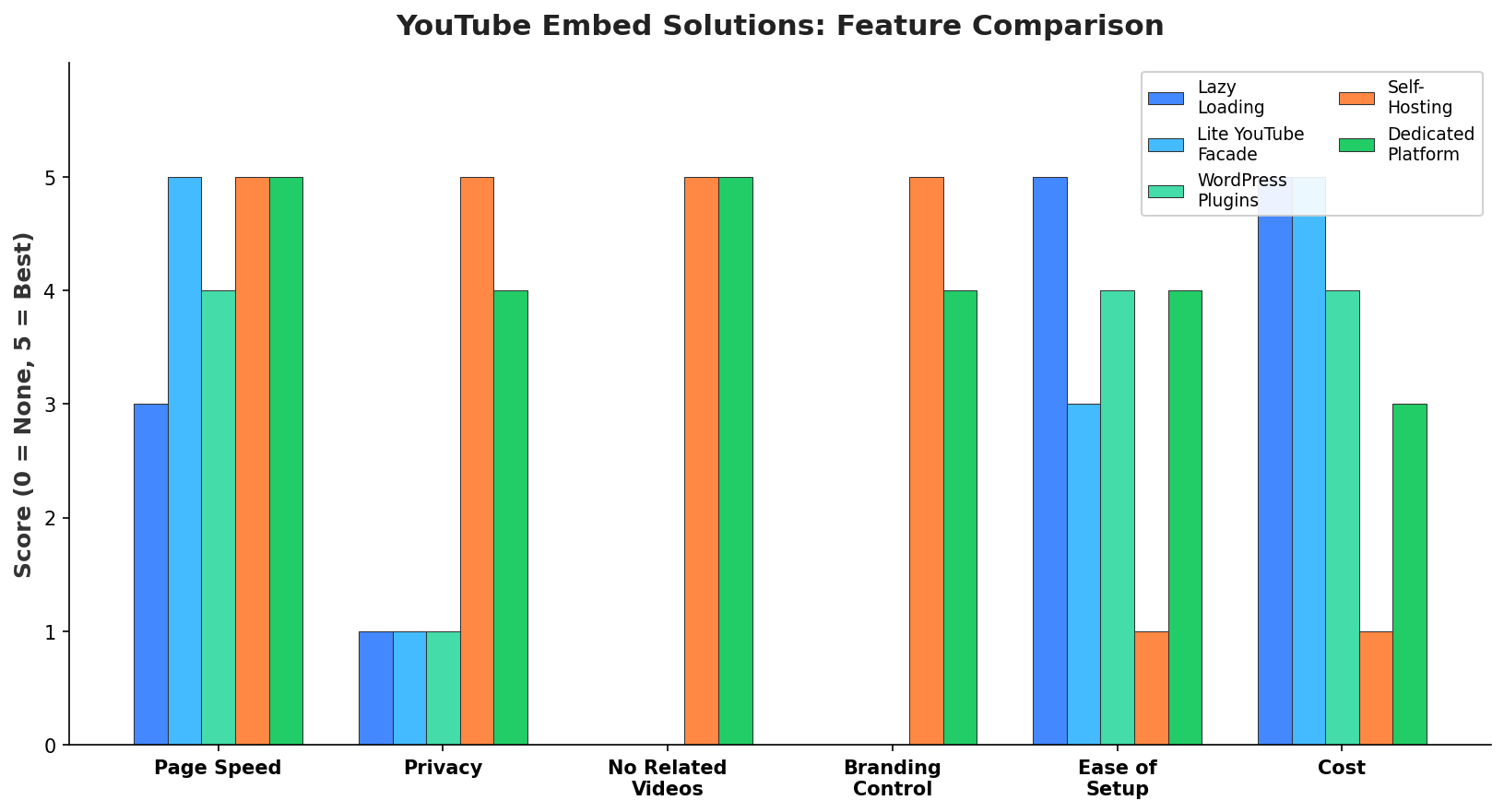
Option 1: Lazy Load Your Embeds
The simplest fix for the performance problem is lazy loading. Instead of loading the YouTube iframe immediately, you wait until the user scrolls the video into view.
Modern browsers support native lazy loading:
<iframe loading="lazy" src="https://www.youtube.com/embed/VIDEO_ID"></iframe>This helps with initial page load, but it doesn't solve the problem of YouTube's resources loading once the video comes into view. The moment that iframe loads, you're back to the same 1+ MB of resources.
Pros: Simple to implement, improves initial page load
Cons: Doesn't reduce total resource usage, doesn't solve privacy or traffic leak issues
Option 2: Use a Facade (Lite YouTube Embed)
A more effective approach is using a facade—a lightweight placeholder that looks like a YouTube video but doesn't load any YouTube resources until the user clicks play.
Paul Irish's lite-youtube-embed web component is popular. According to Frontend Masters, it renders "approximately 224x faster" than a standard embed.
The facade approach works like this:
- Show a static thumbnail image (about 18 KB)
- Wait for user to click the play button
- Replace the thumbnail with the actual YouTube iframe
Pros: Dramatically improves page speed, only loads YouTube when needed
Cons: Requires custom code, still has privacy issues once video plays, still shows related videos
Option 3: WordPress Plugins
If you're on WordPress, plugins like WP Rocket and FlyingPress have YouTube lazy loading built in. These automate the facade approach without requiring custom code.
Pros: Easy to implement, handles technical details
Cons: Adds another plugin dependency, doesn't solve all YouTube problems
Option 4: Self-Host Your Videos
The most control comes from hosting videos yourself. You encode the videos, upload them to your server or a CDN, and use a player like Video.js or Plyr.
Pros: Complete control over experience, no YouTube branding, no related videos, no tracking
Cons: Expensive (CDN costs can be $0.02-0.08 per GB), complex to set up, requires ongoing maintenance, need to handle encoding and adaptive bitrate streaming
Option 5: Use a Dedicated Video Hosting Platform
Platforms like Vimeo, Wistia, or Swarmify SmartVideo offer professional video hosting without YouTube's downsides. They provide clean players, fast loading, and keep visitors on your site.
For a detailed comparison of options, see our guide to YouTube competitors and alternatives.
Pros: Professional experience, no ads, no related videos, faster loading, GDPR-friendly options
Cons: Monthly cost (though often less than self-hosting)
The Trade-Off: When YouTube Embeds Make Sense
I've laid out the problems, but I want to be honest about the trade-offs. YouTube embeds aren't all bad. Here's when they might still be the right choice:
YouTube embeds work when:
- You need organic discovery (YouTube is the world's second-largest search engine)
- You're okay with sending traffic to YouTube in exchange for free hosting
- Your content isn't commercial-critical (blog posts, informational content)
- You don't have budget for paid video hosting
- You use lazy loading/facades to mitigate performance impact
YouTube embeds hurt when:
- You have commercial pages (product pages, landing pages, sales pages)
- Page speed directly affects your revenue (e-commerce, lead generation)
- You need GDPR compliance without complex workarounds
- Your brand demands a professional, uncluttered experience
- Competitor ads appearing on your site is unacceptable
The key is understanding what you're trading. As we've explored in how YouTube videos impact site speed, the exchange isn't free hosting for nothing—it's free hosting in exchange for traffic, branding, data, and user experience.
Frequently Asked Questions
How much do YouTube embeds slow down my website?
Can I completely disable related videos on YouTube embeds?
Are YouTube embeds GDPR compliant?
Does YouTube show ads on embedded videos even if I'm not monetized?
What is lite-youtube-embed and does it solve all the problems?
Does embedding YouTube videos hurt my SEO?
Can I customize the YouTube player's appearance?
What happens when someone clicks related videos on my embedded player?
Is self-hosting video better than YouTube?
What's the best alternative to YouTube embeds for my website?
Will lazy loading YouTube embeds hurt my video SEO?
The Bottom Line
YouTube embeds are convenient. They're free. They work. But they come with real costs that many website owners don't fully understand until they see their Core Web Vitals tank or watch their analytics show traffic bleeding to YouTube.
The solution isn't necessarily to abandon YouTube entirely. It's to make an informed decision based on your specific needs:
- If performance matters, use lazy loading or facades
- If privacy compliance matters, implement proper consent flows
- If keeping visitors on your site matters, consider alternatives
- If brand professionalism matters, use a player you can control
The days of pasting YouTube embed codes without thinking are over. In 2026, with Core Web Vitals affecting rankings and privacy regulations tightening, the true cost of "free" is higher than ever.
At Swarmify, we built SmartVideo specifically for website owners who want to keep using their YouTube content while eliminating the downsides. It automatically imports your videos, serves them through an accelerated CDN, and presents them in a clean, professional player without ads, branding, or traffic leaks.